<?xml version="1.0" encoding="utf-8"?>
<feed xml:lang="en-US" 
xmlns:media="http://search.yahoo.com/mrss/" 
xmlns:content="http://purl.org/rss/1.0/modules/content/"
xmlns="http://www.w3.org/2005/Atom">
    
        
            <link href="https://alansartlog.com/tags/videos/rss/index.xml" rel="self" type="application/atom+xml"  />
            <title>Alan&#39;s Art Log - Tag:videos</title>
            <link type="text/html" href="https://alansartlog.com/tags/videos" rel="alternate"/>
            <id>https://alansartlog.com/tags/videos</id>
        
    
    <subtitle>Paintings, sketches, tutorials, videos, and art related DIY projects.</subtitle>
    <category term="Art"></category>
    <icon>https://alansartlog.com/resources/images/pencil-logo-icon-150x150.jpg</icon>
    
    <updated>2019-02-16T23:35:34+00:00</updated>
    <author>
        <name>Alan North</name>
        <email>alansartlog@gmail.com</email>
    </author>

    
    <rights>© Copyright 2017-2019 Alan North - All rights reserved unless otherwise stated.</rights>

    
        <entry>
    
    <title>How to Scan Objects into 3D Models II - Settings and Setup Comparisons</title>
    <link href="https://alansartlog.com/2018/11/how-to-scan-objects-into-3d-models-ii-settings-and-setup-comparisons"/>
    <id>https://alansartlog.com/2018/11/how-to-scan-objects-into-3d-models-ii-settings-and-setup-comparisons</id>


        <content type="html"><![CDATA[<p>This is a follow up to my previous <a href="https://www.youtube.com/watch?v=GaYfpGcXxmA">video</a>/<a href="/2017/02/how-to-turnscan-objects-into-3d-models-with-just-a-camera">post</a>* on how to scan object into 3d models with just a camera using Regard3d (a free Photogrammetry program).</p>
<p>In this video I go in depth into Regard 3Ds settings with visual comparisons and compare different scanning/lighting setups, to show you how you can get the cleanest scan possible.</p>
<iframe src="https://www.youtube.com/embed/7pGJ8rWiecw?autoplay=1" frameborder="0" allowfullscreen></iframe>
<p>*It's not really necessary to have seen the previous video unless you get confused in the program about where to click or how to do something.</p>
<p>In fact, quite a few things didn't work for one reason or another in that video, anything I say here overrides whatever I said in that one, specifically the following:</p>
<ul>
<li>Using a Turntable - It is in fact the best and easiest way to scan things.</li>
<li>Ink Stains - Seems like they might actually cause more problems sometimes.</li>
<li>The Incremental Reconstruction Engine - It works for me now, and it so much better than the Global Reconstruction.</li>
<li>The Texture Bug - If you did not know already, it has been fixed, so it's no longer a problem.</li>
</ul>
<h2 id="presentation">Presentation</h2>
<p>You can find the presentation below (or <a href="https://alanscodelog.github.io/presentation-regard3d">direct link</a>). This is what I will keep updated.</p>
<iframe src="https://alanscodelog.github.io/presentation-regard3d"></iframe>
<h3 id="updates">Updates</h3>
<p>I do not have the time at the moment to convert the presentation to a write up. So in case anything else pops up in the future, if anybody finds better settings or something, I will keep a list here, detailing changes/updates to the presentation.</p>
<h2 id="testpicturesets">Test Picture Sets</h2>
<p>You can find the test picture sets (all CC-BY licensed) along with other potentially useful links here: <a href="https://github.com/AlansCodeLog/photogrammetry-test-sets">Photogrammetry Test Sets</a>. </p>
<p>If you use the picture sets for a video or blog post and/or find something interesting about the settings, I'd love to know, feel free to leave a comment or send me an email.</p>
<p>Additionally if you have any picture sets you're willing to contribute, mine are all hosted in individual repos in a gitlab group, so it's easy to add other's repos to it, see the Contributing section in the link above.</p>
<h2 id="links">Links</h2>
<p><a href="http://www.regard3d.org/">Regard3d</a></p>
<p><a href="http://mion.faireal.net/BES/">BES</a></p>
<p>For the point cloud comparisons I used a free program called <a href="https://www.danielgm.net/cc/">CloudCompare</a>.</p>
<p>If you're interested in sculpting, you can see how I made the <a href="/2017/11/sculpting-and-painting-a-skull">skull sculpt here</a>.</p>
<h2 id="othernews3dprinterlifeperspectivevideos">Other News (3D Printer, Life, Perspective Videos)</h2>
<p><a class="read-more" href="/2018/11/how-to-scan-objects-into-3d-models-ii-settings-and-setup-comparisons">Read More…</a></p>]]></content>
    
    <link rel="service.post" type="text/html" href="https://alansartlog.com/2018/11/how-to-scan-objects-into-3d-models-ii-settings-and-setup-comparisons#disqus_thread" title="Comment"/>
    
        <category term="https://alansartlog.com/tags/3d" label="3d"></category>
    
        <category term="https://alansartlog.com/tags/3d-model" label="3d model"></category>
    
        <category term="https://alansartlog.com/tags/toolssoftware" label="tools/software"></category>
    
        <category term="https://alansartlog.com/tags/tutorials" label="tutorials"></category>
    
        <category term="https://alansartlog.com/tags/videos" label="videos"></category>
    
    
    <updated>2018-11-07T00:00:00+00:00</updated>
</entry>

    
        <entry>
    
    <title>How to Remote Debug Blender with VS Code</title>
    <link href="https://alansartlog.com/2018/01/how-to-remote-debug-blender-with-vs-code"/>
    <id>https://alansartlog.com/2018/01/how-to-remote-debug-blender-with-vs-code</id>


        <content type="html"><![CDATA[<iframe src="https://www.youtube.com/embed/UVDf2VSmRvk?autoplay=1" frameborder="0" allowfullscreen></iframe>
<p>In this video I'll show you how to setup everything so you can remote debug Blender from VS Code to make it easier to develop and debug addons and the source code by adding breakpoints and stepping through your code.</p>
<p>If you're a programmer and you're semi-familiar with Python, VS Code, and the command line, you can probably just read the documentation on github and it'll make sense, but I know I would have been stumped as a beginner and I really think the extra setup is well worth it, even more so if you're a beginner. I only got started messing with Blender addons a few weeks ago and this has made it so much easier to code.</p>
<h1 id="links">Links</h1>
<p><strong><a href="https://www.python.org/">Python</a></strong></p>
<p><strong><a href="https://github.com/alanscodelog/blender-debugger-for-vscode">Blender Debugger for VS Code Addon + Documentation</a></strong></p>
<p>I would have put this on my coding blog, but I don't really have that set up properly yet or active, I'll put a link when I do.</p>]]></content>
    
    <link rel="service.post" type="text/html" href="https://alansartlog.com/2018/01/how-to-remote-debug-blender-with-vs-code#disqus_thread" title="Comment"/>
    
        <category term="https://alansartlog.com/tags/3d" label="3d"></category>
    
        <category term="https://alansartlog.com/tags/videos" label="videos"></category>
    
        <category term="https://alansartlog.com/tags/programming" label="programming"></category>
    
        <category term="https://alansartlog.com/tags/toolssoftware" label="tools/software"></category>
    
        <category term="https://alansartlog.com/tags/random" label="random"></category>
    
    
    <updated>2018-01-23T00:00:00+00:00</updated>
</entry>

    
        <entry>
    
        <media:thumbnail url="https://alansartlog.com//resources/uploads/skull-sculpt.jpg"/>
        
            <media:description type="html"></media:description>
        
    
    <title>Sculpting and Painting a Skull</title>
    <link href="https://alansartlog.com/2017/11/sculpting-and-painting-a-skull"/>
    <id>https://alansartlog.com/2017/11/sculpting-and-painting-a-skull</id>


        <content type="html"><![CDATA[<iframe src="https://www.youtube.com/embed/Gwoz0pMSmjo?autoplay=1" frameborder="0" allowfullscreen></iframe>]]></content>
    
    <link rel="service.post" type="text/html" href="https://alansartlog.com/2017/11/sculpting-and-painting-a-skull#disqus_thread" title="Comment"/>
    
        <category term="https://alansartlog.com/tags/acrylics" label="acrylics"></category>
    
        <category term="https://alansartlog.com/tags/anatomy" label="anatomy"></category>
    
        <category term="https://alansartlog.com/tags/artwork" label="artwork"></category>
    
        <category term="https://alansartlog.com/tags/sculpting" label="sculpting"></category>
    
        <category term="https://alansartlog.com/tags/studies" label="studies"></category>
    
        <category term="https://alansartlog.com/tags/videos" label="videos"></category>
    
    
    <updated>2017-11-13T00:00:00+00:00</updated>
</entry>

    
        <entry>
    
        <media:thumbnail url="https://alansartlog.com//resources/uploads/skull-studies.jpg"/>
        
            <media:description type="html"></media:description>
        
    
    <title>Skull Studies</title>
    <link href="https://alansartlog.com/2017/11/skull-studies"/>
    <id>https://alansartlog.com/2017/11/skull-studies</id>


        <content type="html"><![CDATA[<iframe src="https://www.youtube.com/embed/U8ap2fyUcfs?autoplay=1" frameborder="0" allowfullscreen></iframe>]]></content>
    
    <link rel="service.post" type="text/html" href="https://alansartlog.com/2017/11/skull-studies#disqus_thread" title="Comment"/>
    
        <category term="https://alansartlog.com/tags/anatomy" label="anatomy"></category>
    
        <category term="https://alansartlog.com/tags/studies" label="studies"></category>
    
        <category term="https://alansartlog.com/tags/videos" label="videos"></category>
    
        <category term="https://alansartlog.com/tags/artwork" label="artwork"></category>
    
    
    <updated>2017-11-04T00:00:00+00:00</updated>
</entry>

    
        <entry>
    
    <title>How to Export Models from Regard3D with Textures</title>
    <link href="https://alansartlog.com/2017/07/how-to-export-models-from-regard3d-with-textures"/>
    <id>https://alansartlog.com/2017/07/how-to-export-models-from-regard3d-with-textures</id>


        <content type="html"><![CDATA[<p><strong>EDIT: This post is outdated. The bug has been fixed.</strong></p>
<iframe src="https://www.youtube.com/embed/fsi9OTTa-Ng?autoplay=1" frameborder="0" allowfullscreen></iframe>
<p>If you saw my previous post/video about scanning objects into 3d models you'll know the current version of the program I used, <a href="http://www.regard3d.org/">Regard3D</a>, has a bug with exporting objects with image textures.</p>
<p>The <a href="https://github.com/rhiestan/Regard3D/issues/4">developer is aware of it</a> and it should get fixed eventually, but in the meantime, a viewer sent me an email with a better workaround so I thought I'd go over it.</p>
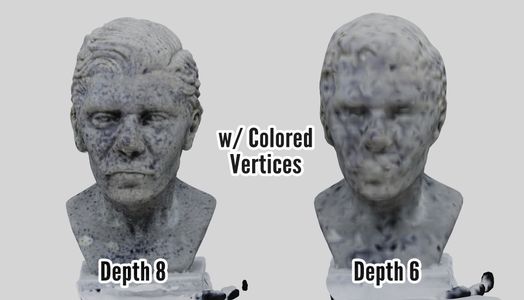
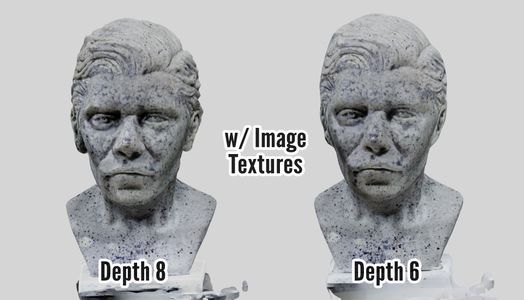
<p>In the video I mentioned one way to get around it, and that is to use colored vertices, but as was pointed out to me, this creates much fuzzier textures at equal resolutions whereas an image texture will retain it's detail no matter the resolution of the model. I personally did not care about them so I didn't really investigate further, but the solution is embarrassingly simple if I would have thought about it more than two seconds.</p>
<p>We know the program saves everything as it creates it to the project directory and it can correctly make and read textured models from there so the files in the project folder must be fine, the bug occurs only when a model is exported.</p>
<h2 id="steps">Steps</h2>
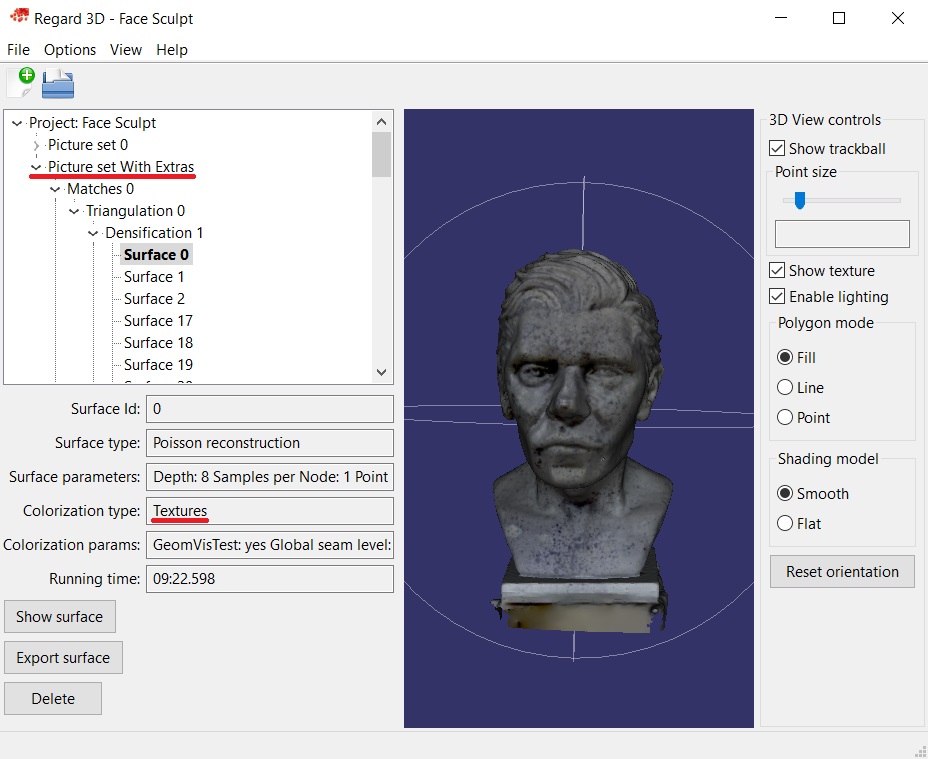
<p>So what we can do is once we created our surface model with image textures (<code>Colorization Type</code> should say <code>Textures</code>), instead of exporting it, note down it's path in our project tree. For the picture set, just count which it is from 0.</p>
<figure>
<div class="lazy-wrapper"><img src="https://alansartlog.com/resources/uploads/3d-scan-texture-path.jpg"  width="928" height="759"  alt="Project%20Tree%20in%20Regard%203D"/></div>
</figure>
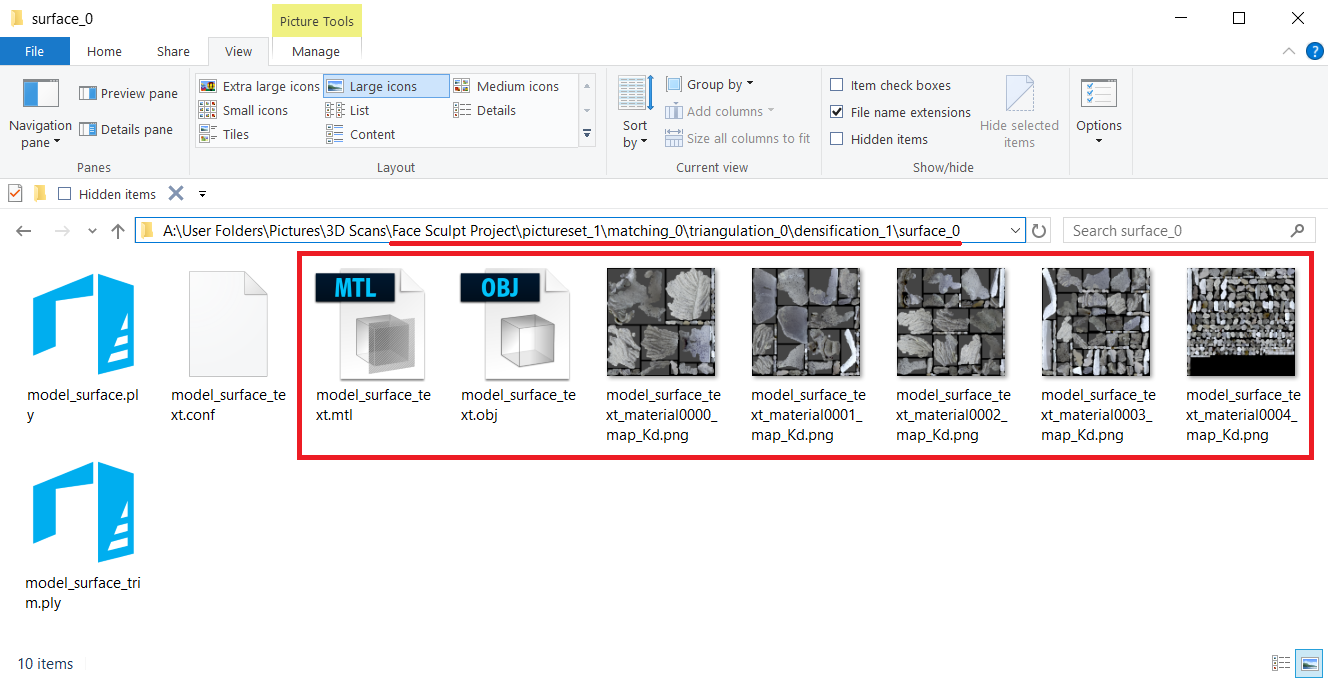
<p>Then open up the project folder in your computer and navigate to the path (e.g. <code>Project Folder &gt; pictureset_1 &gt; matching_0 &gt; triangulation_0 &gt; densification_1 &gt; surface_0</code>). Once there you'll see a bunch of files. We need the <strong>obj</strong> file (our model), the <strong>mtl</strong> or material library file (tells programs where to look for the textures), and the texture <strong>images</strong>. Copy them manually wherever you wanted to export them to.</p>
<figure>
<div class="lazy-wrapper"><img src="https://alansartlog.com/resources/uploads/3d-scan-files-to-export.jpg"  width="1328" height="678"  alt="Project%20Tree%20in%20Regard%203D"/></div>
</figure>
<p>Now we can import these into Blender (make sure your import extension for obj files is on) and they should work import automatically. If the textures aren't showing up just make sure you're using the Blender render engine and that you're in the texture view. This is how Blender imports them by default. To use them with a different rendering engine you'll have to connect the textures manually.</p>
<h2 id="proscons">Pros &amp; Cons</h2>
<table>
<thead>
<tr>
<th>Colored Vertices</th>
<th>Image Textures</th>
</tr>
</thead>
<tbody>
<tr>
<td>Fuzzy Textures</td>
<td>Detailed Textures</td>
</tr>
<tr>
<td>Smaller File Size at Same Detail</td>
<td>Much Larger but…</td>
</tr>
<tr>
<td>Looks Much Worse at Low Resolutions*</td>
<td>Same Texture Detail at Low Resolutions*</td>
</tr>
<tr>
<td>Computes Faster (2x +)</td>
<td>Computes Slower (but again ^)</td>
</tr>
<tr>
<td>Duller/Less Reflective</td>
<td>Captures more lighting artifacts.**</td>
</tr>
</tbody>
</table>
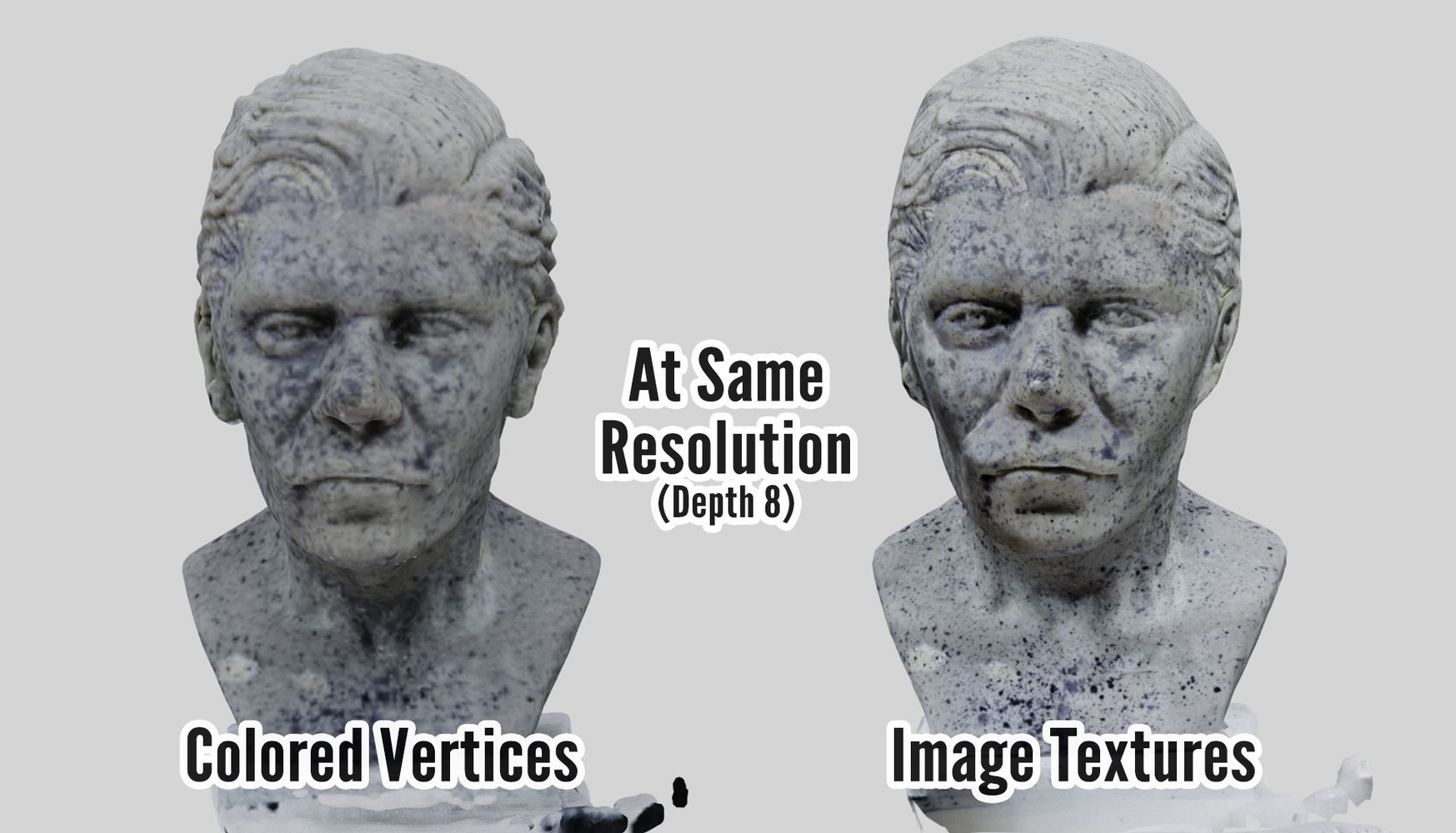
<p>*This is because with colored vertices the amount of detail is tied to the amount of points, whereas with image textures, the texture is always the same resolution so it preserves it's details no matter the mesh's resolution.</p>
<p>This is why in the image below, even though we're at the same mesh resolution, the colored vertices make the texture look fuzzy.</p>
<figure>
<div class="lazy-wrapper"><img src="https://alansartlog.com/resources/uploads/3d-scan-resolution-comparison-both-at-d8.jpg"  width="1747" height="1000"  alt="Both%20at%20Depth%208"/></div>
</figure>
<p>**By less reflective I mean that you don't get a lot of weird really light areas, especially if you had uneven lighting or scanned the model by turning it instead of turning the camera around the model. This causes lighting artifacts which are more noticeable when using image textures. I'm not 100% sure why that is, but it means using colored vertices might still be the better option if you don't care about the textures of your objects, just the color, and you want the scan to process faster.</p>
<p>For example, if you were scanning a smooth multi-colored toy, you'd need to add texture to it somehow like I did with this model by spraying it with ink. So you'd have to paint the model by hand anyways if you wanted textures, so you'd only really need a rough reference of the object's colors, image textures would be overkill.</p>
<p>Anyways, here are some more examples for comparison.</p>
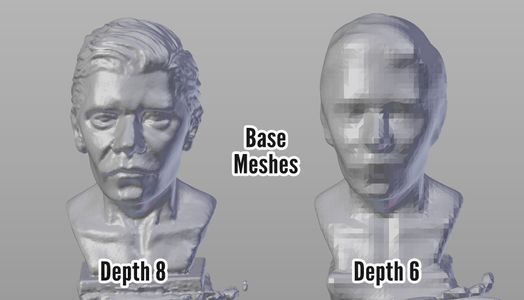
<div class="gallery force3"><figure><div class="lazy-wrapper"><img is_thumb="true" src="https://alansartlog.com/resources/uploads/3d-scan-resolution-comparison-base-meshes-524x300.jpg"  width="524" height="300"  alt="The%20Base%20Meshes%20at%20Depth%208%20&%206"/></div></figure><figure><div class="lazy-wrapper"><img is_thumb="true" src="https://alansartlog.com/resources/uploads/3d-scan-resolution-comparison-w-colored-vertices-524x300.jpg"  width="524" height="300"  alt="Colored%20Vertices%20at%20Depth%208%20&%206"/></div></figure><figure><div class="lazy-wrapper"><img is_thumb="true" src="https://alansartlog.com/resources/uploads/3d-scan-resolution-comparison-w-image-textures-524x300.jpg"  width="524" height="300"  alt="Image%20Textures%20at%20Depth%208%20&%206"/></div></figure></div>
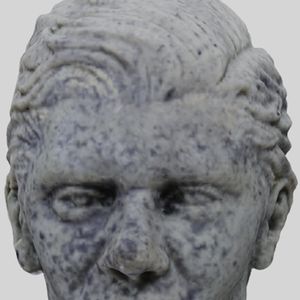
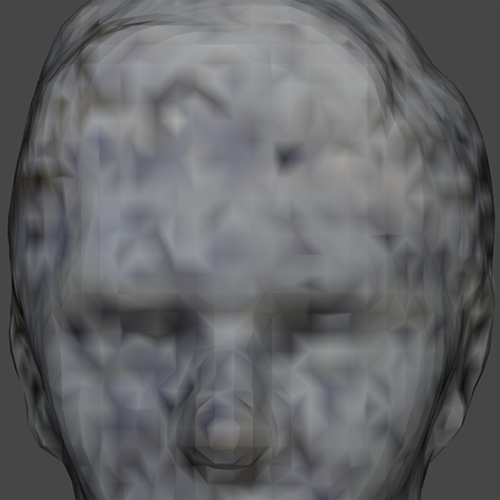
<p>And here are some closeups, you can see how much detail the second one appears to hold even though the mesh is quite simple. If you have a keen eye you'll notice the textures aren't 100% the same, that's just because the program pieces them together slightly different at the different resolutions, but you can see the amount of detail is the same.</p>
<div class="gallery force4"><figure><div class="lazy-wrapper"><img is_thumb="true" src="https://alansartlog.com/resources/uploads/3d-scan-d8-colored-vertices-300x300.jpg"  width="300" height="300"  alt="Depth%208%20w/%20Colored%20Vertices%20Closeup"/></div><figcaption><p>Depth 8 w/ Colored Vertices</p></figcaption></figure><figure><div class="lazy-wrapper"><img src="https://alansartlog.com/resources/uploads/3d-scan-d6-colored-vertices.jpg"  width="500" height="500"  alt="Depth%206%20w/%20Colored%20Vertices%20Closeup"/></div><figcaption><p>Depth 6 w/ Colored Vertices</p></figcaption></figure><figure><div class="lazy-wrapper"><img is_thumb="true" src="https://alansartlog.com/resources/uploads/3d-scan-d8-textured-300x300.jpg"  width="300" height="300"  alt="Depth%208%20w/%20Texture%20Images%20Closeup"/></div><figcaption><p>Depth 8 w/ Texture Images</p></figcaption></figure><figure><div class="lazy-wrapper"><img src="https://alansartlog.com/resources/uploads/3d-scan-d6-textured.jpg"  width="500" height="500"  alt="Depth%206%20w/%20Texture%20Images%20Closeup"/></div><figcaption><p>Depth 6 w/ Texture Images</p></figcaption></figure></div>
<h2 id="othernotes">Other Notes</h2>
<p>For those who might be wondering if it's possible to salvage the exported raw file, I did think it might be a simple bug, maybe an extra line or symbol or something that could be corrected by just editing the raw file, but the file is missing a lot of coordinates. Still I can open it in Meshlab and all the points are there, so if for some reason you lost all the files by this one, you could use the points to do the poisson surface reconstruction from there, though of course, you wouldn't be able to salvage the textures.</p>]]></content>
    
    <link rel="service.post" type="text/html" href="https://alansartlog.com/2017/07/how-to-export-models-from-regard3d-with-textures#disqus_thread" title="Comment"/>
    
        <category term="https://alansartlog.com/tags/3d" label="3d"></category>
    
        <category term="https://alansartlog.com/tags/3d-model" label="3d model"></category>
    
        <category term="https://alansartlog.com/tags/photogrammetry" label="photogrammetry"></category>
    
        <category term="https://alansartlog.com/tags/regard3d" label="regard3d"></category>
    
        <category term="https://alansartlog.com/tags/toolssoftware" label="tools/software"></category>
    
        <category term="https://alansartlog.com/tags/tutorials" label="tutorials"></category>
    
        <category term="https://alansartlog.com/tags/videos" label="videos"></category>
    
    
    <updated>2017-07-07T15:43:03+00:00</updated>
</entry>

    
        <entry>
    
        <media:thumbnail url="https://alansartlog.com//resources/uploads/teapot.jpg"/>
        
            <media:description type="html">&lt;p&gt;&lt;a href=&#34;http://mrg.bz/9d7ea9&#34;&gt;Reference from mourguefile&lt;/a&gt;&lt;/p&gt;</media:description>
        
    
    <title>Teapot - Quick Oil Study</title>
    <link href="https://alansartlog.com/2017/03/teapot-quick-oil-study"/>
    <id>https://alansartlog.com/2017/03/teapot-quick-oil-study</id>


        <content type="html"><![CDATA[<iframe src="https://www.youtube.com/embed/gPh4Ht9H-xA?autoplay=1" frameborder="0" allowfullscreen></iframe>]]></content>
    
    <link rel="service.post" type="text/html" href="https://alansartlog.com/2017/03/teapot-quick-oil-study#disqus_thread" title="Comment"/>
    
        <category term="https://alansartlog.com/tags/artwork" label="artwork"></category>
    
        <category term="https://alansartlog.com/tags/oils" label="oils"></category>
    
        <category term="https://alansartlog.com/tags/studies" label="studies"></category>
    
        <category term="https://alansartlog.com/tags/videos" label="videos"></category>
    
    
    <updated>2017-03-28T00:00:00+00:00</updated>
</entry>

    
        <entry>
    
        <media:thumbnail url="https://alansartlog.com//resources/uploads/beach.jpg"/>
        
            <media:description type="html">&lt;p&gt;Reference (used under &lt;a href=&#34;https://creativecommons.org/licenses/by/2.0/&#34;&gt;CC-BY license&lt;/a&gt;: &lt;a href=&#34;http://flickr.com/photo.gne?id=29867528681&#34;&gt;Aquarelle marine 3 by E. D&#39;Ascoli Photographies&lt;/a&gt;&lt;/p&gt;</media:description>
        
    
    <title>Beach - Quick Color Study</title>
    <link href="https://alansartlog.com/2017/03/beach-quick-color-study"/>
    <id>https://alansartlog.com/2017/03/beach-quick-color-study</id>


        <content type="html"><![CDATA[<iframe src="https://www.youtube.com/embed/Z91Vs1Ts6i8?autoplay=1" frameborder="0" allowfullscreen></iframe>
<p>Here's the initial thumb sized study:</p>
<p><div class="lazy-wrapper"><img src="https://alansartlog.com/resources/uploads/beach-thumb.jpg"  width="500" height="366"  alt="Beach Thumb" /></div></p>]]></content>
    
    <link rel="service.post" type="text/html" href="https://alansartlog.com/2017/03/beach-quick-color-study#disqus_thread" title="Comment"/>
    
        <category term="https://alansartlog.com/tags/artwork" label="artwork"></category>
    
        <category term="https://alansartlog.com/tags/acrylics" label="acrylics"></category>
    
        <category term="https://alansartlog.com/tags/studies" label="studies"></category>
    
        <category term="https://alansartlog.com/tags/videos" label="videos"></category>
    
    
    <updated>2017-03-20T00:00:00+00:00</updated>
</entry>

    
        <entry>
    
    <title>How to Turn/Scan Objects Into 3D Models With Just a Camera</title>
    <link href="https://alansartlog.com/2017/02/how-to-turnscan-objects-into-3d-models-with-just-a-camera"/>
    <id>https://alansartlog.com/2017/02/how-to-turnscan-objects-into-3d-models-with-just-a-camera</id>


        <content type="html"><![CDATA[<iframe src="https://www.youtube.com/embed/GaYfpGcXxmA?autoplay=1" frameborder="0" allowfullscreen></iframe>
<p>In this video I'll be showing you how you can turn almost any object into a 3D model with just your camera and some free software.</p>
<p>Now I'm not an expert at any of this. I've tried as best as possible to read through all the documentation, at least the parts I understand, and condense that into a video.</p>
<p>Also please note the cleanup process was aimed at getting it ready for sculpting. I know that people like to scan objects to then 3d print them, but I don't have a 3d printer, so you'll have to look somewhere else for the details on how to do that properly.</p>
<p>Lastly, I would love to share the project file so you can see what I tested but it's HUGE (15GB) and I'm not sharing the 3d model just yet because it's an original character of mine so I'm working on a generic version for practicing lighting the face, <a href="https://www.patreon.com/posts/16456416">the first version is now available for patreons</a>.</p>
<h1 id="intro">Intro</h1>
<p>So there are free programs out there like Autodesk 123D Catch (which was a bit limited when I checked it out) and there are some open source programs like VisualSFM but I wanted something that was both open source, and therefore free (w/ no patent issues) AND allowed for commercial use, and the only program that seemed to satisfy that requirement was Regard3D. Also it's the only one of the open source programs that takes you from the photos to the finished model. Otherwise you might have needed 2-3 different programs as this <a href="https://pfalkingham.wordpress.com/2016/09/14/trying-all-the-free-photogrammetry/">blog post</a> illustrates.</p>
<p>Regard 3D Pros:</p>
<ul>
<li>Open source</li>
<li>All-In-One Solution</li>
<li>Advanced options. (but also works well out of the box)</li>
<li>Simple Nice UI.</li>
<li>Branching (saves past parameters)</li>
<li>File "Autosaves" Crashes only loose what was computing.</li>
<li>Allows Exporting (of sparse and dense point clouds as well as models)</li>
</ul>
<p>Cons:</p>
<ul>
<li><del>Texture bug (<a href="/2017/02/how-to-export-models-from-Regard3D-with-textures">solution</a>)</del>. Has been fixed. </li>
<li>Resource intensive, but then most photogrammetry programs are.</li>
</ul>
<h1 id="thepictures">The Pictures</h1>
<p>The ideal way would be to have the camera rotate around the object with plenty of soft lights. Alas, I could not do that, so my setup was more like two desk lamps which I diffused as much as possible with a piece of paper and a blank white background. I then rotated the object instead of the camera.</p>
<p><div class="lazy-wrapper"><img src="https://alansartlog.com/resources/uploads/scanning-camera-setup.gif"  width="720" height="393"  alt="Camera Setup" /></div></p>
<p>The moving highlights and shadows can cause some problems, but I was able to get a decent scan this way anyways.</p>
<p>Unless your object is made of glass (in which case you'll have to coat it in something so it's matte), and not too glossy it should work.</p>
<h2 id="texture">Texture</h2>
<p>Even if the surface is matte though you need some texture else you won't get any matches. For this you can splatter some ink, or watercolors, or something (test the pigment will not stain first). This will help a lot if your object is a sculpt like mine with minimal texture. Without it the software has no good reference as to where anything is in space.</p>
<h2 id="howmanypicturestotake">How many pictures to take?</h2>
<p>More is always better, but there is also a point where this will just slow down your computer. I recommend 4 different height angles and about ~16 photos each round. In total I took about 74 photos for this not including the extras.</p>
<p>Also if possible your photos should all be with the same camera at the same focal length.</p>
<h1 id="regard3d">Regard 3D</h1>
<h2 id="addingimages">Adding Images</h2>
<p>First create a project: <code>File &gt; New Project</code>. Select where it's going to store the files (it can take up many GBs, mine was ~15GBs by the end of this with so many tries) and the name.</p>
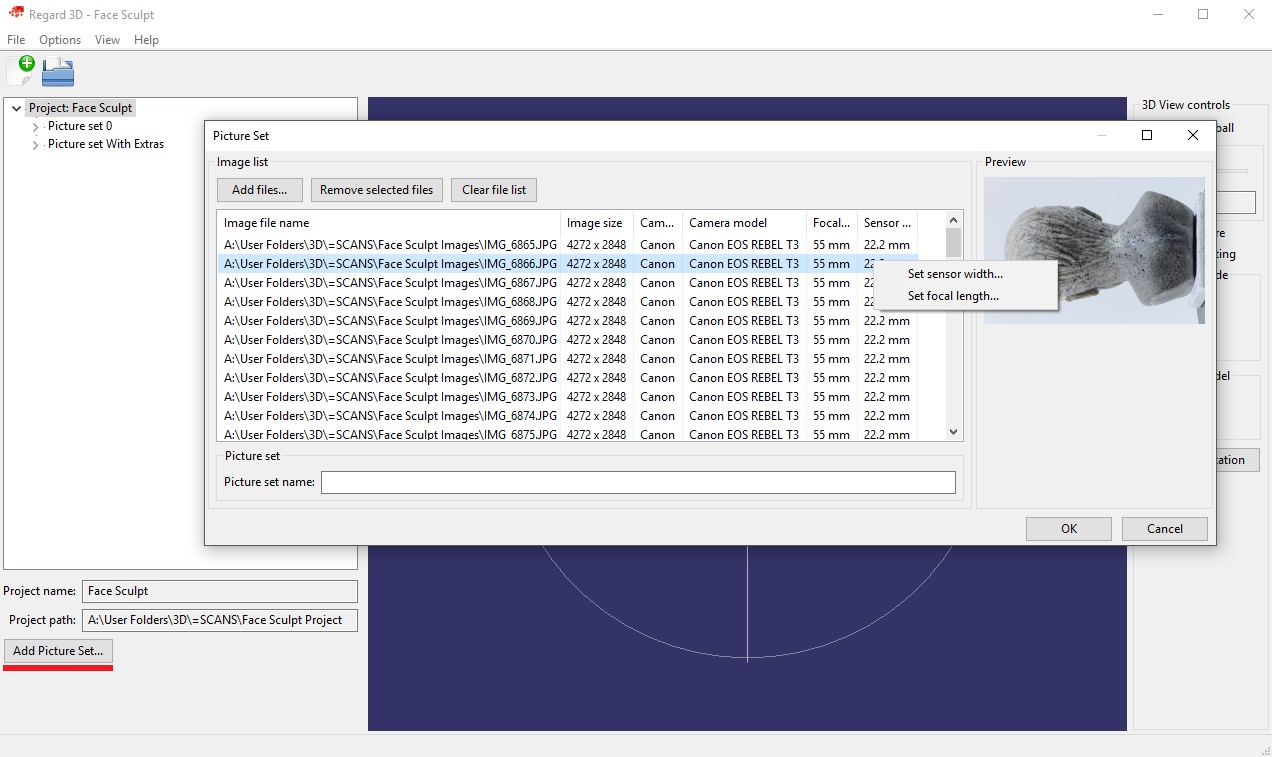
<p>In the lower left you'll see a button that says <code>Add Picture Set...</code></p>
<p><div class="lazy-wrapper"><img src="https://alansartlog.com/resources/uploads/scanning-adding-images.jpg"  width="1272" height="757"  alt="Adding Images Dialog" /></div></p>
<p>Here you can add all your image files. It might take a few seconds for them to load all the metadata. Make sure the camera model, focal length, and sensor size are set. If the sensor size is not set in the newest version you can now set it manually (right click) if the program could not find your camera model in it's database. Just google for your camera model and sensor size. If the focal length isn't set you can also set it manually but you'll have to know what focal length you used.</p>
<p>Then just name your picture set something and add all the images.</p>
<p><strong>NOTE: Do not move the images after you've added them or you will get an error trying to open the project. This can be fixed by opening the <code>.r3d</code> file in the project folder with notepad or some other text editor and finding and replacing the incorrect paths, but be warned.</strong></p>
<h2 id="computingmatches">Computing Matches</h2>
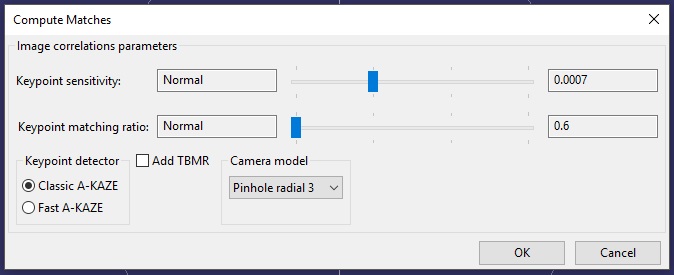
<p>Now the Regard3D documentation, link below, goes more in depth into some of the options. I'm not going to go over everything, just cover some of the stuff it doesn't cover or what I learned worked best for me from experience.</p>
<p>Here the default settings work pretty well. I found on my laptop (specs at the end) setting <code>keypoint sensitivity</code> too high would cause it to crash (EDIT: this no longer happens on my new better desktop). Setting the <code>keypoint matching ratio</code> to high though and the <code>keypoint sensitivity</code> to low improved some of my results without crashing.</p>
<p><div class="lazy-wrapper"><img src="https://alansartlog.com/resources/uploads/scanning-compute-matches.jpg"  width="674" height="275"  alt="Computing Matches Dialog" /></div></p>
<p>This can take a while, up to an hour for me at least (EDIT: Takes me 5-15 min on my new computer!).</p>
<h3 id="treestructure">Tree Structure</h3>
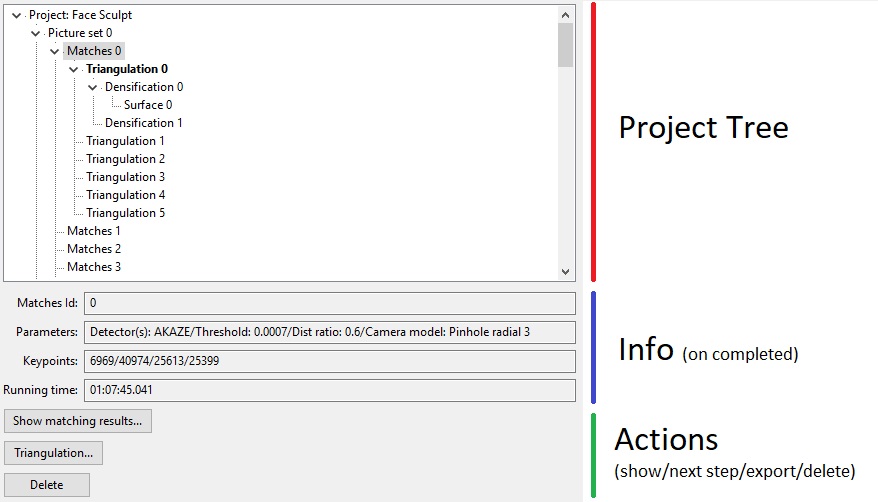
<p>So at this point you'll notice the tree view in the sidebar has started branching out. Here's what a finished project looks like for example:</p>
<p><div class="lazy-wrapper"><img src="https://alansartlog.com/resources/uploads/scanning-left-sidebar.jpg"  width="878" height="502"  alt="Project Tree" /></div></p>
<p>At any point you can go back and check the parameters you used, how much time it took, etc, and each level will give you different options depending on what stage you're on.</p>
<p>You can also export point clouds and models to other programs from here if that stage allows for it.</p>
<h3 id="arethereenoughmatches">Are there enough matches?</h3>
<p>If you click on your matches you should now see several options in the lower left: </p>
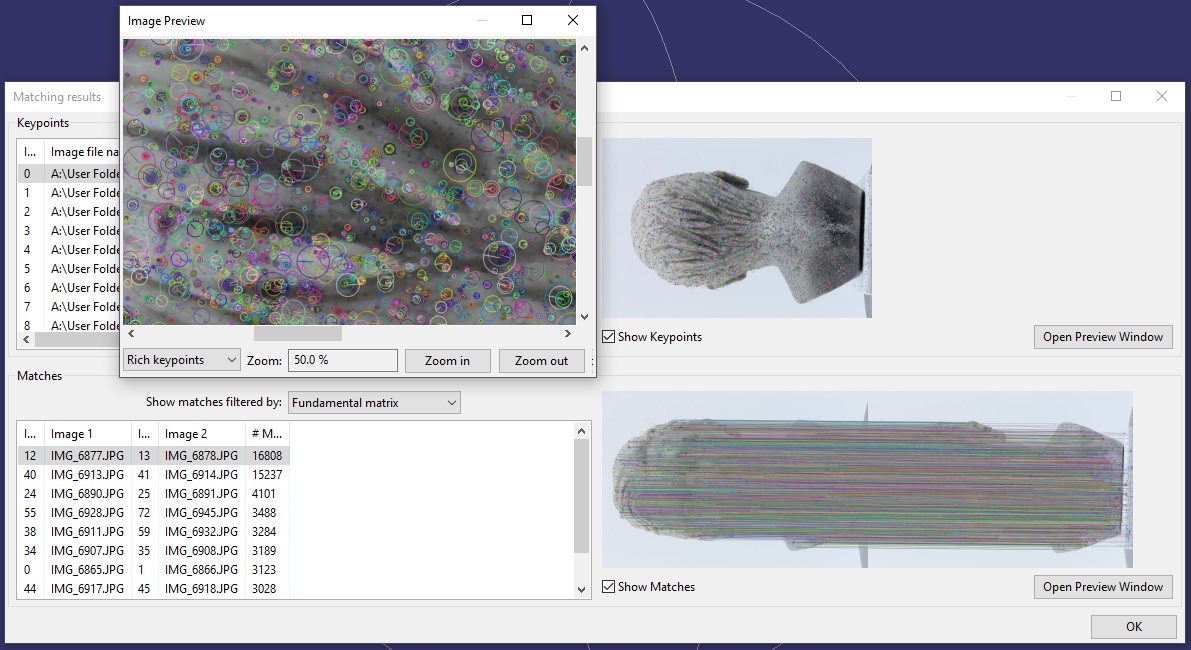
<p>If you click <code>Show matching results...</code> you'll get a dialog showing you the matches. At first you won't see anything different.</p>
<p>Check <code>Show Keypoints</code> to actually show the matches. Even then you might not quite see them. So to zoom in you can <code>Open Preview Window</code> and you should now be able to see a bunch of little circles around the ink splatters.</p>
<p>To see matches between pairs, in the lower half click <code>Show Matches</code>. It might take a second to load. And if you took your pictures right you should see just a bunch of lines, to the point you can't even see the images well.</p>
<p><div class="lazy-wrapper"><img src="https://alansartlog.com/resources/uploads/scanning-image-matches.jpg"  width="1191" height="650"  alt="Matches Dialog" /></div></p>
<h2 id="triangulation">Triangulation</h2>
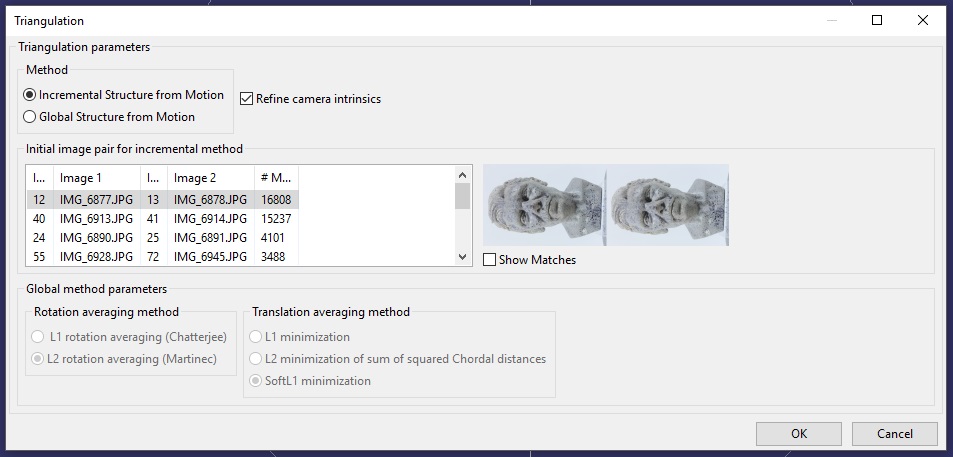
<p>Next you're going to want to triangulate these matches. Basically in photogrammetry there's two point clouds you need to create, a sparse and a dense point cloud. This will create the first.</p>
<p>Click <code>Triangulation</code>.</p>
<p>There's two options here, <code>Incremental Structure from Motion</code> and <code>Global Structure from Motion</code>.</p>
<p><div class="lazy-wrapper"><img src="https://alansartlog.com/resources/uploads/scanning-triangulation.jpg"  width="953" height="457"  alt="Triangulation Options Dialog" /></div> </p>
<p>I could not get the first to work, it just crashes (EDIT: This no longer happens to me on my new computer and it works better sometimes).</p>
<p>So I use Global. </p>
<p>As to the other options, some match a few more cameras than others, but they didn't make much of a difference.</p>
<p>This shouldn't take that long to compute, just a few minutes.</p>
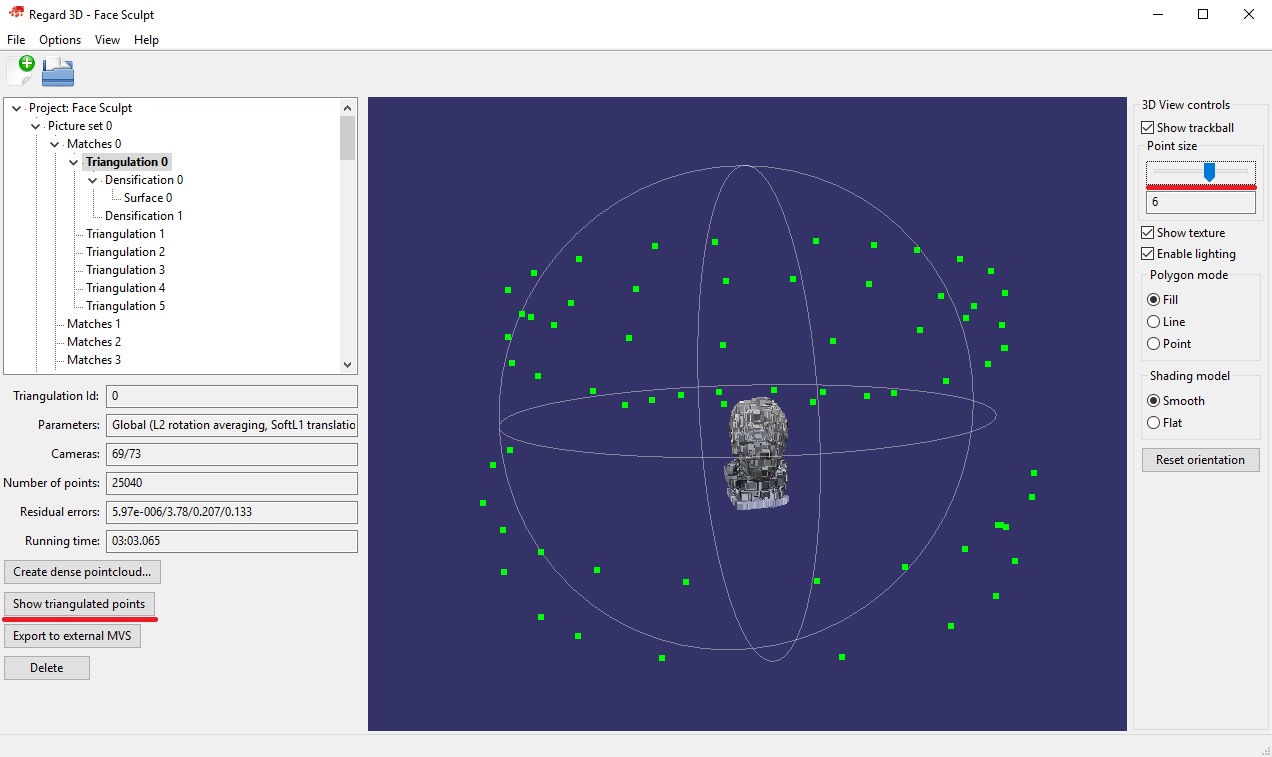
<p>Finally you'll be able to see some points on the screen. If you load some other model and want to get back to this you can always just <code>Show Triangulated Points</code>.</p>
<p><div class="lazy-wrapper"><img src="https://alansartlog.com/resources/uploads/scanning-showing-triangulation.jpg"  width="1272" height="757"  alt="Triangulation Dialog" /></div> </p>
<p>You can also make the points bigger by moving the <code>Point size</code> slider in the top right. You should now be able to see a bunch of little green dots. Those are the cameras it captured. And in the lower left there's a field that tells you how many cameras were captured out of the total. Usually ~80/90% or more is enough.</p>
<h2 id="densification">Densification</h2>
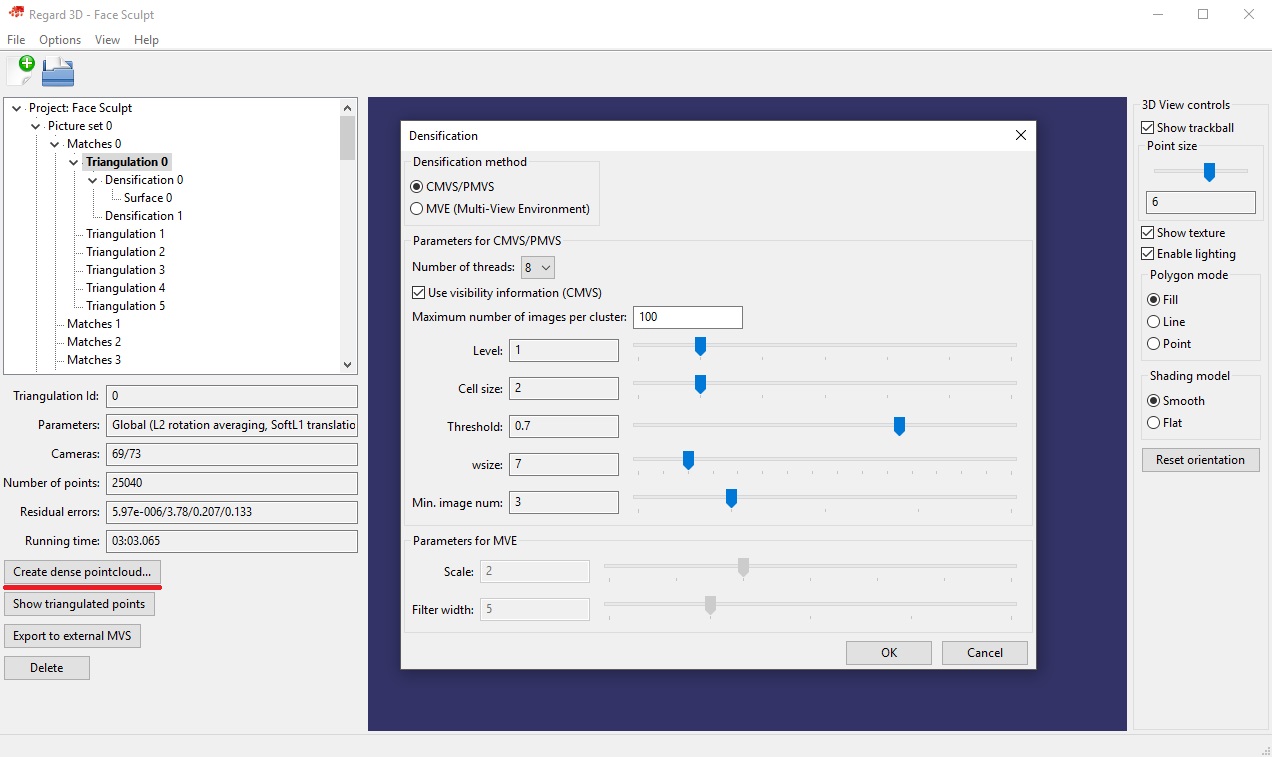
<p>From your triangulation click <code>Create dense pointcloud...</code>. </p>
<p>Here you basically have two options <code>CMVS/PMVS</code> and <code>MVE</code>.</p>
<p><div class="lazy-wrapper"><img src="https://alansartlog.com/resources/uploads/scanning-densification.jpg"  width="1272" height="757"  alt="Densification Dialog" /></div> </p>
<h3 id="cmvspmvs">CMVS/PMVS</h3>
<p><code>Use visibility information</code> : Uncheck this if you don't have that many images (~70 is not many) can produce better results because it will use more cameras.</p>
<p><code>Levels</code> : This is like the resolution. With a lower number being a higher resolution.</p>
<p><code>Threshold</code> : Increasing this can help reduce artifacts.</p>
<p><code>Cell size</code> : Related to the resolution, works similar to <code>Level</code>.</p>
<p><code>Min. image num</code>: If a point only appeared in 2 images but this is set to 3 it won't use it, so I suggest lowering this to 2 for the amount of photos I recommended.</p>
<p>Now I prefer MVE because I could not get Level 1 to work for me, only Level 2 and it looks worse than the defaults for MVE which do work for me.</p>
<p>This one does take a lot less time though (couple of minutes). And it seems to produce nicer point clouds with less artifacts but the end model did not look as nice as with MVE.</p>
<p>BUT you loose the option later to do a Floating Surface Reconstruction.</p>
<h3 id="mve">MVE</h3>
<p><code>Scale</code>: The resolution with a lower number being a higher resolution.</p>
<p>The problem with MVE is that anything but the defaults seems to create a lot of weird artifacts and nothing but the defaults seemed to work.</p>
<p>It also takes a lot longer (2-3h) Edit: On my new computer it's now 10-30min. If your computer isn't very powerful you might get out of memory errors. Try closing all your programs and just leaving it to run for a while or overnight, sometimes it will recover and finish.</p>
<p>But it does allow you do do Floating Surface Reconstructions later.</p>
<h2 id="thedensepointcloud">The Dense Point Cloud</h2>
<p>The view might lag quite a bit at this point. You should see something that looks like your object with a few artifacts close to the surface depending on what method you chose. As long as there isn't a large cloud of them, you can still get good results. </p>
<p>For my case MVE at defaults turned out the better result.</p>
<h2 id="creatingthesurface">Creating the Surface</h2>
<p>Click <code>Create Surface</code>.</p>
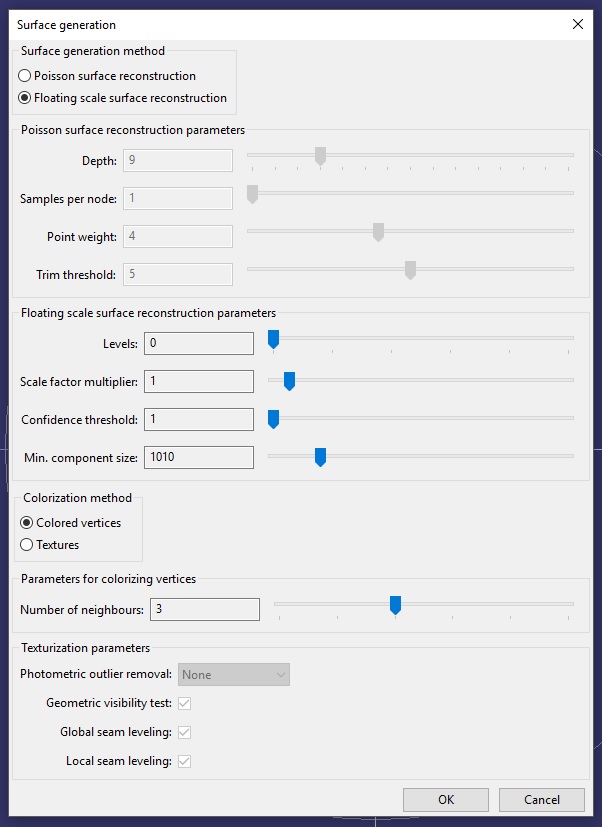
<p>We get the two options, one I already mentioned…</p>
<p><div class="lazy-wrapper"><img src="https://alansartlog.com/resources/uploads/scanning-surface-reconstruction.jpg"  width="602" height="827"  alt="Surface Reconstruction Dialog" /></div> </p>
<h3 id="floatingsurfacereconstruction">Floating Surface Reconstruction</h3>
<p><code>Levels</code>: Like the resolution except now a higher value = more resolution.</p>
<p>This one can take ~1h sometimes for Level 0 which is the lowest so I was not able to try it out much and am not 100% confident as to what some of the other parameters do. I do know though that if you get blobs floating around the model, turning <code>Confidence Threshold</code> and <code>Minimum Component Size</code> up a bit will help get rid of those artifacts.</p>
<h3 id="possionsurfacereconstruction">Possion Surface Reconstruction</h3>
<p>PS: Sorry for the mispronunciation in the video, I literally read this as Poison.</p>
<p>This is my preferred method.</p>
<p><code>Depth</code>: Like the resolution except now a higher value = more resolution. Don't go too high (9-10) or you'll get a lot of artifacts.</p>
<p><code>Samples per Node</code>: Turning this up helps get rid of artifacts.</p>
<p>As for the other two settings, the defaults work well, turning them up just seems to make the base a bit neater.</p>
<h3 id="colorization">Colorization</h3>
<p>As part of the surface reconstruction textures are created.</p>
<p>There used to be a bug with the <code>Textures</code> option, the newest version has fixed it.</p>
<p><code>Textures</code> are more detailed since it will produce image textures, while <code>Colored Vertices</code> depends on the resolution of the mesh but it also a bit faster.</p>
<p>Now the bug is fixed I do not recommend <code>Colored Vertices</code> unless you don't care about the textures at all. unfortunately you can't preview the surface without the textures if you used <code>Colored Vertices</code> so it kind of negates that instance too.</p>
<p>If you use <code>Textures</code> you can toggle them off in the sidebar to the right.</p>
<h2 id="exporting">Exporting</h2>
<p>From here we'll need to export our model for cleanup in other programs. You can use either Meshlab, it's free  (you can also do the surface reconstruction of point clouds from there) but it's very hard to understand and the newest version does not work for me, or Blender.</p>
<p>I could not record the cleanup because the mesh was so huge and freezing my computer, but at the end of the video I try to illustrate the basic steps I took with a simple sphere.</p>
<h2 id="links">LINKS</h2>
<p><a href="http://www.Regard3D.org/">Regard3D + Tutorial/Documentation</a></p>
<p><a href="http://www.meshlab.net/">Meshlab</a>&nbsp;(I was using 1.3.4BETA)</p>
<p><a href="https://www.blender.org/">Blender</a></p>
<p>If your object is particularly small I recommend you look at <a href="http://alansartlog.com/2015/08/magic-lantern-on-my-canon-rebel-t31100d#link-focus-stacking">this part of the tutorial I wrote on magic lantern</a> (you don't need it to apply the concepts described but it's helpful if you have an DSLR camera).</p>
<p>PS: To give you an idea of the type how long it might take on your computer, or what type of computer you need, I'm using a laptop with an Intel i5, 8GB of RAM, and a NVIDIA 650M GPU.</p>
<p>Edit: And my new computer is a desktop with a Ryzen 1500x, 16GB of DDR4 RAM, and an NVIDIA 1050Ti so you can see why it no longer struggles.</p>]]></content>
    
    <link rel="service.post" type="text/html" href="https://alansartlog.com/2017/02/how-to-turnscan-objects-into-3d-models-with-just-a-camera#disqus_thread" title="Comment"/>
    
        <category term="https://alansartlog.com/tags/3d" label="3d"></category>
    
        <category term="https://alansartlog.com/tags/3d-model" label="3d model"></category>
    
        <category term="https://alansartlog.com/tags/sculpting" label="sculpting"></category>
    
        <category term="https://alansartlog.com/tags/toolssoftware" label="tools/software"></category>
    
        <category term="https://alansartlog.com/tags/tutorials" label="tutorials"></category>
    
        <category term="https://alansartlog.com/tags/videos" label="videos"></category>
    
    
    <updated>2017-02-03T23:19:42+00:00</updated>
</entry>

    
        <entry>
    
    <title>Polymer Clay Basics Part III</title>
    <link href="https://alansartlog.com/2016/12/polymer-clay-basics-part-iii"/>
    <id>https://alansartlog.com/2016/12/polymer-clay-basics-part-iii</id>


        <content type="html"><![CDATA[<iframe src="https://www.youtube.com/embed/PVCMBBy-K_s?autoplay=1" frameborder="0" allowfullscreen></iframe>
<p>This is the third and last part of the polymer clay basics tutorial. I will be covering the different tools I use, blending clay, and doing some real time demonstrations. Because so much of this part is visual I won't be transcribing it to a post.</p>]]></content>
    
    <link rel="service.post" type="text/html" href="https://alansartlog.com/2016/12/polymer-clay-basics-part-iii#disqus_thread" title="Comment"/>
    
        <category term="https://alansartlog.com/tags/art-supplies" label="art supplies"></category>
    
        <category term="https://alansartlog.com/tags/sculpting" label="sculpting"></category>
    
        <category term="https://alansartlog.com/tags/tutorials" label="tutorials"></category>
    
        <category term="https://alansartlog.com/tags/videos" label="videos"></category>
    
    
    <updated>2016-12-22T18:37:27+00:00</updated>
</entry>

    
        <entry>
    
    <title>Polymer Clay Basics - Part II</title>
    <link href="https://alansartlog.com/2016/12/polymer-clay-basics-part-ii"/>
    <id>https://alansartlog.com/2016/12/polymer-clay-basics-part-ii</id>


        <content type="html"><![CDATA[<iframe src="https://www.youtube.com/embed/g5m9kNVKDhQ?autoplay=1" frameborder="0" allowfullscreen></iframe>
<p>This is part two of the polymer clay basics tutorial.&nbsp;See <a href="http://alansartlog.com/2016/12/polymer-clay-basics-part-ii">Part I</a> here.</p>
<h2 id="armatures">Armatures</h2>
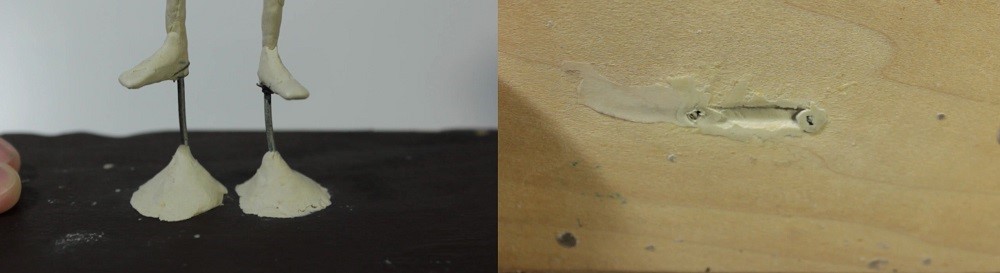
<p>My first tip is to use a sturdy bulked out armature that's a attached or can be easily attached to some sort of base. You do not want to try sculpting anything complex without an armature because you'll never find a place to grip it without ruining a different part.</p>
<p><div class="lazy-wrapper"><img src="https://alansartlog.com/resources/uploads/Polymer-Clay-Basics-2-Armature-Feet.jpg"  width="1000" height="273"  alt="" /></div></p>
<p>For a figure you can run the main wires through the base of a piece of wood like this.&nbsp;</p>
<p>And on the top and bottom I used a special 2 part epoxy clay to secure it, more on that in a bit.</p>
<p><a class="read-more" href="/2016/12/polymer-clay-basics-part-ii">Read More…</a></p>]]></content>
    
    <link rel="service.post" type="text/html" href="https://alansartlog.com/2016/12/polymer-clay-basics-part-ii#disqus_thread" title="Comment"/>
    
        <category term="https://alansartlog.com/tags/art-supplies" label="art supplies"></category>
    
        <category term="https://alansartlog.com/tags/sculpting" label="sculpting"></category>
    
        <category term="https://alansartlog.com/tags/toolssoftware" label="tools/software"></category>
    
        <category term="https://alansartlog.com/tags/tutorials" label="tutorials"></category>
    
        <category term="https://alansartlog.com/tags/videos" label="videos"></category>
    
    
    <updated>2016-12-09T17:22:11+00:00</updated>
</entry>

    
        <entry>
    
    <title>Polymer Clay Basics - Part I</title>
    <link href="https://alansartlog.com/2016/12/polymer-clay-basics-part-i"/>
    <id>https://alansartlog.com/2016/12/polymer-clay-basics-part-i</id>


        <content type="html"><![CDATA[<iframe src="https://www.youtube.com/embed/iPBNeFi3P8g?autoplay=1" frameborder="0" allowfullscreen></iframe>
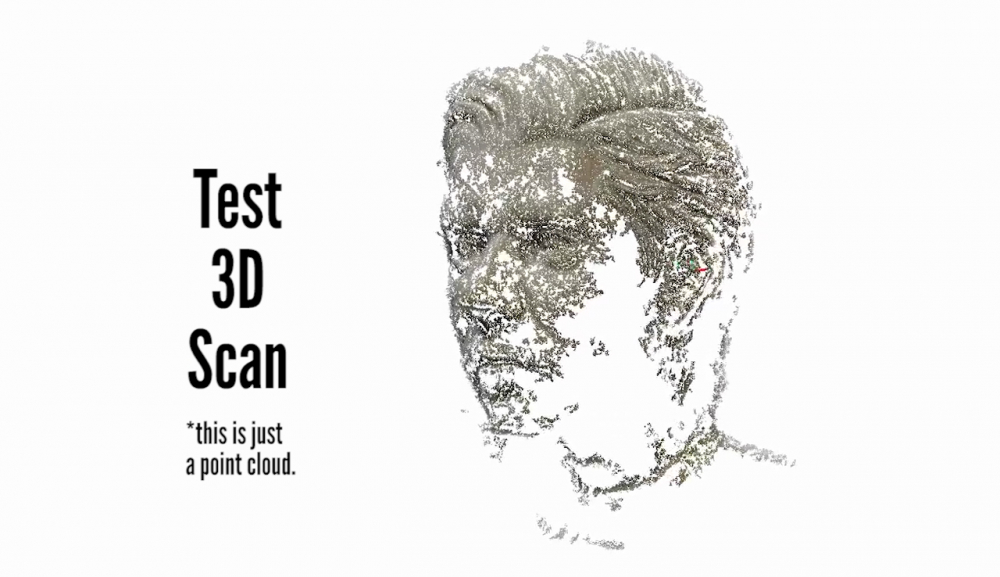
<p>So since I read the Imaginative Realism book that I reviewed I started on a head sculpt to have as reference. I had been working on a 3d model of a head before that, but it's not done yet. I thought I'd take the chance to get back into sculpting, plus it's faster than 3d modeling for me still and it's always nice to have something physical. I don't have a 3d printer, so I can't print any 3d models I make, but it's possible to turn a sculpt like this into a 3d model with just a camera and the right software.</p>
<p><div class="lazy-wrapper"><img src="https://alansartlog.com/resources/uploads/polymer-clay-basics-test-3d-scan.jpg"  width="1000" height="577"  alt="" /></div></p>
<p><a class="read-more" href="/2016/12/polymer-clay-basics-part-i">Read More…</a></p>]]></content>
    
    <link rel="service.post" type="text/html" href="https://alansartlog.com/2016/12/polymer-clay-basics-part-i#disqus_thread" title="Comment"/>
    
        <category term="https://alansartlog.com/tags/3d-model" label="3d model"></category>
    
        <category term="https://alansartlog.com/tags/sculpting" label="sculpting"></category>
    
        <category term="https://alansartlog.com/tags/tutorials" label="tutorials"></category>
    
        <category term="https://alansartlog.com/tags/videos" label="videos"></category>
    
    
    <updated>2016-12-03T15:55:13+00:00</updated>
</entry>

    
        <entry>
    
        <media:thumbnail url="https://alansartlog.com//resources/uploads/Head-Sculpt-Thumb.jpg"/>
        
    
    <title>Head Sculpt Timelapse</title>
    <link href="https://alansartlog.com/2016/11/head-sculpt-timelapse"/>
    <id>https://alansartlog.com/2016/11/head-sculpt-timelapse</id>


        <content type="html"><![CDATA[<iframe src="https://www.youtube.com/embed/VVaQoLw6byI?autoplay=1" frameborder="0" allowfullscreen></iframe>
<p>So this was just a test recording to see how well I could record me sculpting and it didn't turn out too well but I didn't want to just delete all this footage and the video I had planned got delayed for various reasons so I thought I'd post this anyway.</p>
<p><a class="read-more" href="/2016/11/head-sculpt-timelapse">Read More…</a></p>]]></content>
    
    <link rel="service.post" type="text/html" href="https://alansartlog.com/2016/11/head-sculpt-timelapse#disqus_thread" title="Comment"/>
    
        <category term="https://alansartlog.com/tags/artwork" label="artwork"></category>
    
        <category term="https://alansartlog.com/tags/sculpting" label="sculpting"></category>
    
        <category term="https://alansartlog.com/tags/videos" label="videos"></category>
    
    
    <updated>2016-11-25T16:58:37+00:00</updated>
</entry>

    
        <entry>
    
        <media:thumbnail url="https://alansartlog.com//resources/uploads/Imaginitve-Realism-Cover.jpg"/>
        
            <media:description type="html">&lt;p&gt;Imaginative Realism: How to Paint What Doesn&#39;t Exist by James Gurney
224 Pages - Paperback&lt;/p&gt;</media:description>
        
    
    <title>Review of Imaginitive Realism by James Gurney</title>
    <link href="https://alansartlog.com/2016/11/book-review-imaginitive-realism"/>
    <id>https://alansartlog.com/2016/11/book-review-imaginitive-realism</id>


        <content type="html"><![CDATA[<iframe src="https://www.youtube.com/embed/GZIWGMqte2A?autoplay=1" frameborder="0" allowfullscreen></iframe>
<p>So this book has been on my wishlist for a while and I recently discovered bookdepository which is significantly cheaper for me where I live so I decided to try it out.</p>
<h2 id="bookdepository">Book Depository</h2>
<p>First of all you might want to know that the "free" part of the Book depository shipping is actually included in the price and differs depending on where you buy it from. I only realized this because I had someone in the US buy it for me and they told me they actually paid even less than the price I was seeing (which was still ~10 dollars less than amazon). They had no problem putting in my address here in Argentina though. Apparently it's just where the site is seeing you coming from so you could probably use a secure VPN to get around this, but I have no idea how legal that might be or if that breaks their terms of use or something.</p>
<p>They said 15 days max to arrive, but there are crazy import restrictions in my country, so it probably got delayed by customs. It took nearly a month and a half to arrive since they shipped it out. If you're in Argentina I&nbsp;<em>still</em> had to go pick it up and pay $50 pesos, so door-to-door is still not working properly. At least they did not open the package or anything.</p>
<h3 id="packaging">Packaging</h3>
<p>It was pretty nicely packed in the box you see in the video. In fact I've been struggling without how I'm going to ship paintings if I make them on stretched canvas and I'm going to copy their idea in part&nbsp;because it doesn't require me to buy a box. It's basically made out of one long strip of cardboard cut like the diagram below.</p>
<p><a class="read-more" href="/2016/11/book-review-imaginitive-realism">Read More…</a></p>]]></content>
    
    <link rel="service.post" type="text/html" href="https://alansartlog.com/2016/11/book-review-imaginitive-realism#disqus_thread" title="Comment"/>
    
        <category term="https://alansartlog.com/tags/art-books" label="art books"></category>
    
        <category term="https://alansartlog.com/tags/reviews" label="reviews"></category>
    
        <category term="https://alansartlog.com/tags/videos" label="videos"></category>
    
    
    <updated>2016-11-03T18:07:40+00:00</updated>
</entry>

    
        <entry>
    
    <title>Inktober Sketches and Drawings</title>
    <link href="https://alansartlog.com/2016/10/inktober-sketches-and-drawings"/>
    <id>https://alansartlog.com/2016/10/inktober-sketches-and-drawings</id>


        <content type="html"><![CDATA[<iframe src="https://www.youtube.com/embed/ScRYvdB_H90?autoplay=1" frameborder="0" allowfullscreen></iframe>
<p>These are all the drawings I managed to do for inktober. You can see me flip through the sketchbook and talk a little about them in the video below. I also made a <a href="https://www.youtube.com/playlist?list=PLZcWAAGgTGfovgtQWtlf0wwD_wcgA8hM1">playlist</a> with all the drawings I recorded. They're silent, but I added some details about the process for each in the description.</p>
<p>You can also go through all the drawings and any preparatory sketches I posted below.</p>
<p><a class="read-more" href="/2016/10/inktober-sketches-and-drawings">Read More…</a></p>]]></content>
    
    <link rel="service.post" type="text/html" href="https://alansartlog.com/2016/10/inktober-sketches-and-drawings#disqus_thread" title="Comment"/>
    
        <category term="https://alansartlog.com/tags/inkmarker" label="ink/marker"></category>
    
        <category term="https://alansartlog.com/tags/studies" label="studies"></category>
    
        <category term="https://alansartlog.com/tags/videos" label="videos"></category>
    
    
    <updated>2016-10-29T18:27:21+00:00</updated>
</entry>

    
        <entry>
    
        <media:thumbnail url="https://alansartlog.com//resources/uploads/crowned-pawn.jpg"/>
        
            <media:description type="html">&lt;p&gt;Crowned Pawn
Reference&amp;nbsp;(from morgueFile: &lt;a href=&#34;http://mrg.bz/0ca100&#34;&gt;Image&lt;/a&gt;by svklimkin&lt;/p&gt;</media:description>
        
    
    <title>&#34;Crowned Pawn&#34; - Acrylic Painting</title>
    <link href="https://alansartlog.com/2016/09/crowned-pawn-acrylic-painting"/>
    <id>https://alansartlog.com/2016/09/crowned-pawn-acrylic-painting</id>


        <content type="html"><![CDATA[<iframe src="https://www.youtube.com/embed/RSx2Zh06xjM?autoplay=1" frameborder="0" allowfullscreen></iframe>
<p>In this video I talk about trying to keep the the painting lose and a few things I tried to help that.</p>]]></content>
    
    <link rel="service.post" type="text/html" href="https://alansartlog.com/2016/09/crowned-pawn-acrylic-painting#disqus_thread" title="Comment"/>
    
        <category term="https://alansartlog.com/tags/acrylics" label="acrylics"></category>
    
        <category term="https://alansartlog.com/tags/artwork" label="artwork"></category>
    
        <category term="https://alansartlog.com/tags/for-sale" label="for sale"></category>
    
        <category term="https://alansartlog.com/tags/videos" label="videos"></category>
    
    
    <updated>2016-09-02T16:07:50+00:00</updated>
</entry>

    
        <entry>
    
        <media:thumbnail url="https://alansartlog.com//resources/uploads/highclere-castle.jpg"/>
        
            <media:description type="html">&lt;p&gt;Highclere Castle
Reference&amp;nbsp;(from morgueFile): &lt;a href=&#34;http://mrg.bz/312f23&#34;&gt;Image&lt;/a&gt;&amp;nbsp;by johninportland&lt;/p&gt;</media:description>
        
    
    <title>Palette Knife Painting of Highclere Castle</title>
    <link href="https://alansartlog.com/2016/08/palette-knife-painting-of-highclere-castle"/>
    <id>https://alansartlog.com/2016/08/palette-knife-painting-of-highclere-castle</id>


        <content type="html"><![CDATA[<p>In this video I experiment with a palette knife for the first time, and talk about how that helped force me to simply details, and also how to flatten warped canvas paper for when you need to make straight lines.</p>
<p>I really like painting and drawing buildings so two of the reference photos I had printed are castles. This one is Highclere Castle which most of you will probably recognize from Downton Abbey&nbsp;from Downton Abbey. It's on my ever growing list of places to go see. &nbsp;If it looks amazing in photos I can't imagine in real life.</p>
<iframe src="https://www.youtube.com/embed/s9DRbB6auio?autoplay=1" frameborder="0" allowfullscreen></iframe>]]></content>
    
    <link rel="service.post" type="text/html" href="https://alansartlog.com/2016/08/palette-knife-painting-of-highclere-castle#disqus_thread" title="Comment"/>
    
        <category term="https://alansartlog.com/tags/acrylics" label="acrylics"></category>
    
        <category term="https://alansartlog.com/tags/artwork" label="artwork"></category>
    
        <category term="https://alansartlog.com/tags/for-sale" label="for sale"></category>
    
        <category term="https://alansartlog.com/tags/videos" label="videos"></category>
    
    
    <updated>2016-08-25T22:16:33+00:00</updated>
</entry>

    
        <entry>
    
        <media:thumbnail url="https://alansartlog.com//resources/uploads/water-lily.jpg"/>
        
            <media:description type="html">&lt;p&gt;Water Lily
Reference&amp;nbsp;(from morgueFile): &lt;a href=&#34;http://mrg.bz/17eeea&#34;&gt;Image&lt;/a&gt;&amp;nbsp;by morethanordinary&lt;/p&gt;</media:description>
        
    
    <title>Painting a Water Lily in Acrylics</title>
    <link href="https://alansartlog.com/2016/08/painting-a-water-lily-in-acrylics"/>
    <id>https://alansartlog.com/2016/08/painting-a-water-lily-in-acrylics</id>


        <content type="html"><![CDATA[<iframe src="https://www.youtube.com/embed/RmxlxopPzlo?autoplay=1" frameborder="0" allowfullscreen></iframe>
<p>This painting is for sale, contact me if you're interested.</p>]]></content>
    
    <link rel="service.post" type="text/html" href="https://alansartlog.com/2016/08/painting-a-water-lily-in-acrylics#disqus_thread" title="Comment"/>
    
        <category term="https://alansartlog.com/tags/acrylics" label="acrylics"></category>
    
        <category term="https://alansartlog.com/tags/artwork" label="artwork"></category>
    
        <category term="https://alansartlog.com/tags/for-sale" label="for sale"></category>
    
        <category term="https://alansartlog.com/tags/portfolio" label="portfolio"></category>
    
        <category term="https://alansartlog.com/tags/videos" label="videos"></category>
    
    
    <updated>2016-08-08T23:42:30+00:00</updated>
</entry>

    
        <entry>
    
    <title>How to Make a Stay Wet Palette to Keep Your Paints Wet</title>
    <link href="https://alansartlog.com/2016/08/how-to-make-a-stay-wet-palette-to-keep-your-paints-wet"/>
    <id>https://alansartlog.com/2016/08/how-to-make-a-stay-wet-palette-to-keep-your-paints-wet</id>


        <content type="html"><![CDATA[<iframe src="https://www.youtube.com/embed/wac6PYpG9JM?autoplay=1" frameborder="0" allowfullscreen></iframe>]]></content>
    
    <link rel="service.post" type="text/html" href="https://alansartlog.com/2016/08/how-to-make-a-stay-wet-palette-to-keep-your-paints-wet#disqus_thread" title="Comment"/>
    
        <category term="https://alansartlog.com/tags/acrylics" label="acrylics"></category>
    
        <category term="https://alansartlog.com/tags/art-supplies" label="art supplies"></category>
    
        <category term="https://alansartlog.com/tags/diy" label="diy"></category>
    
        <category term="https://alansartlog.com/tags/videos" label="videos"></category>
    
    
    <updated>2016-08-06T23:09:18+00:00</updated>
</entry>

    
        <entry>
    
        <media:thumbnail url="https://alansartlog.com//resources/uploads/full-size-adhesion-tests.jpg"/>
        
    
    <title>How to Keep Acrylic Paints Wet - Adhesion Tests</title>
    <link href="https://alansartlog.com/2016/07/how-to-keep-acrylic-paints-wet-adhesion-tests"/>
    <id>https://alansartlog.com/2016/07/how-to-keep-acrylic-paints-wet-adhesion-tests</id>


        <content type="html"><![CDATA[<iframe src="https://www.youtube.com/embed/Z17Q9eTHJOc?autoplay=1" frameborder="0" allowfullscreen></iframe>
<p>The links were in the last post but I put them here again: <a href="http://willkempartschool.com/getting-started-how-to-choose-what-to-paint-on/">The first set of instructions I'd found on Will Kemp's blog in reply to him</a>&nbsp;and <a href="http://oldsite.goldenpaints.com/justpaint/jp13article1.php">the ones I found later on Golden's site on a page about testing surfaces in general</a>.</p>
<p>Above&nbsp;is the scanned pieces of tape,&nbsp;right click &gt; open image in new tab,&nbsp;to see them in full size.</p>]]></content>
    
    <link rel="service.post" type="text/html" href="https://alansartlog.com/2016/07/how-to-keep-acrylic-paints-wet-adhesion-tests#disqus_thread" title="Comment"/>
    
        <category term="https://alansartlog.com/tags/acrylics" label="acrylics"></category>
    
        <category term="https://alansartlog.com/tags/art-supplies" label="art supplies"></category>
    
        <category term="https://alansartlog.com/tags/toolssoftware" label="tools/software"></category>
    
        <category term="https://alansartlog.com/tags/videos" label="videos"></category>
    
    
    <updated>2016-07-29T23:05:03+00:00</updated>
</entry>

    
        <entry>
    
    <title>How to Keep Acrylic Paints Wet - Retarders</title>
    <link href="https://alansartlog.com/2016/07/how-to-keep-acrylic-paints-wet-retarders"/>
    <id>https://alansartlog.com/2016/07/how-to-keep-acrylic-paints-wet-retarders</id>


        <content type="html"><![CDATA[<iframe src="https://www.youtube.com/embed/lBqsvsB-MHw?autoplay=1" frameborder="0" allowfullscreen></iframe>
<p>The adhesion test video is in the next post.</p>
<p>This was the chart I kept for the drying tests. Temperatures were around 12 C for those days like I mentioned in the video. Probably around 20 C inside, maybe less (heater is off at night).</p>
<iframe  width="100%" height="500px" src="https://docs.google.com/spreadsheets/d/12bUVXSpKfcfQCfM-nRmwihCF_hj48uhKCzD9H3okfFU/pubhtml?gid=0&amp;single=true&amp;widget=true&amp;headers=false"></iframe>
<p>Regarding the "watercolors" I know I called them a watercolor substitute, but it's more like they've substituted watercolors for me specifically because they're slower drying, portable, and won't crack. But they're more like something between gouache and oils and yet they have a distinct sticky feel (like warm honey). They're more opaque then watercolors, but they stay wet longer, and yet they have that tendency to stay in that sticky watercolor stage on paper. My mix is about 1:1, more and they flow too much, less and they'd dry in the box because it's not airtight (if the box were airtight I could use less).</p>
<p>I also like them because I can paint at the consistency they're at without accidently over diluting them with water like I usually do watercolors. For example, for a sky, I'll outline the object, then I'll go back on the paper and spread the color around with a water-brush there.</p>
<p>One thing I forgot to mention is that you should use professional grade acrylics for them if you want them to keep their opacity. Additionally if you like gouache you can mix in a bit of titanium white with all your colors to make the even more opaque.</p>
<p>I will do a video with them in the future.</p>]]></content>
    
    <link rel="service.post" type="text/html" href="https://alansartlog.com/2016/07/how-to-keep-acrylic-paints-wet-retarders#disqus_thread" title="Comment"/>
    
        <category term="https://alansartlog.com/tags/acrylics" label="acrylics"></category>
    
        <category term="https://alansartlog.com/tags/art-supplies" label="art supplies"></category>
    
        <category term="https://alansartlog.com/tags/diy" label="diy"></category>
    
        <category term="https://alansartlog.com/tags/videos" label="videos"></category>
    
    
    <updated>2016-07-22T23:11:31+00:00</updated>
</entry>

    
        <entry>
    
    <title>Art Supply Haul + Updates</title>
    <link href="https://alansartlog.com/2016/07/art-supply-haul-updates"/>
    <id>https://alansartlog.com/2016/07/art-supply-haul-updates</id>


        <content type="html"><![CDATA[<iframe src="https://www.youtube.com/embed/r5HkRKTgaYw?autoplay=1" frameborder="0" allowfullscreen></iframe>
<p>Sorry for the lateness I had a lot of trouble uploading because it was so long. There might be some audio gap/jumps because I had to split the video into parts to upload and the youtube editor is horrible for stitching them back together.</p>
<h3 id="tutoriallinks">Tutorial Links</h3>
<p><a href="/2015/10/bottle-cap-palette">Bottle Cap Palette Containers Tutorial</a></p>
<p><a href="/2016/07/how-to-keep-acrylic-paints-wet-retarders">Keeping Your Acrylic Paints Wet - Retarders</a></p>
<p><a href="/2016/08/how-to-make-a-stay-wet-palette-to-keep-your-paints-wet">Keeping Your Acrylic Paints Wet - Stay Wet Palette</a></p>
<p><a href="/2016/07/skull-painting-narrated-timelapse-acrylics-on-plastic">First Painting with New Setup</a></p>
<p>Springy Sketching Pen (Coming Soon)</p>
<p>Torso Tutorial (Planned)</p>]]></content>
    
    <link rel="service.post" type="text/html" href="https://alansartlog.com/2016/07/art-supply-haul-updates#disqus_thread" title="Comment"/>
    
        <category term="https://alansartlog.com/tags/acrylics" label="acrylics"></category>
    
        <category term="https://alansartlog.com/tags/art-supplies" label="art supplies"></category>
    
        <category term="https://alansartlog.com/tags/toolssoftware" label="tools/software"></category>
    
        <category term="https://alansartlog.com/tags/videos" label="videos"></category>
    
    
    <updated>2016-07-06T00:00:00+00:00</updated>
</entry>

    
        <entry>
    
        <media:thumbnail url="https://alansartlog.com//resources/uploads/canyon-oil-painting.jpg"/>
        
            <media:description type="html">&lt;p&gt;Painting of :&amp;nbsp;&lt;a href=&#34;http://flickr.com/photo.gne?id=15562063855&#34;&gt;Bryce Canyon by Anna Panáková&lt;/a&gt;&amp;nbsp;/ used under &lt;a href=&#34;https://creativecommons.org/licenses/by/2.0/&#34;&gt;CC-BY&lt;/a&gt;&lt;/p&gt;</media:description>
        
    
    <title>Canyon Painting (Oils)</title>
    <link href="https://alansartlog.com/2016/06/canyon-painting-oils"/>
    <id>https://alansartlog.com/2016/06/canyon-painting-oils</id>


        <content type="html"><![CDATA[<iframe src="https://www.youtube.com/embed/XIVznrsju_Q?autoplay=1" frameborder="0" allowfullscreen></iframe>
<p>As I mentioned in the video I ended up using the painting to test some glazing techniques. You can see it's been divided into three sections. These were all done after the painting as touch dry. From left to right, my notes were as follows. Not the most precise, but they were meant as more of a starting point.</p>
<ol start="3">
<li><p>One part titanium white to 3-4 parts liquin. Can be wiped nearly clean (compared to 3). Canvas texture smoother (compared to 3)</p></li>
<li><p>A bit of titanium white, couple drops of turps, and a bit of liquin, mixed to kind of a milky consistency. Tends to really sink into the canvas but smoothes fine with a brush, and ended up with the least texture. Can be wiped nearly clean (compared to 3).</p></li>
<li><p>Pure titanium white. Doing it with just a brush was impossible (might be possible with zinc white) so I used my thumb and that also helped reduce the canvas texture. And afterwards I wiped away the excess paint with a rag but it's hard to wipe away completely.</p></li>
</ol>
<p>To avoid using turps I think the best solution would be to just prime and sand the canvas smooth so that paint doesn't get stuck in the canvas texture. With that even pure titanium white could probably be laid very thinly.</p>]]></content>
    
    <link rel="service.post" type="text/html" href="https://alansartlog.com/2016/06/canyon-painting-oils#disqus_thread" title="Comment"/>
    
        <category term="https://alansartlog.com/tags/artwork" label="artwork"></category>
    
        <category term="https://alansartlog.com/tags/oils" label="oils"></category>
    
        <category term="https://alansartlog.com/tags/uncategorized" label="uncategorized"></category>
    
        <category term="https://alansartlog.com/tags/videos" label="videos"></category>
    
    
    <updated>2016-06-24T23:41:35+00:00</updated>
</entry>

    
        <entry>
    
        <media:thumbnail url="https://alansartlog.com//resources/uploads/lighthouse.jpg"/>
        
            <media:description type="html">&lt;p&gt;Lighthouse
Reference:&amp;nbsp;&lt;a href=&#34;http://flickr.com/photo.gne?id=5937150545&#34;&gt;The Kish by PaulODonell&lt;/a&gt;&amp;nbsp;/ used under &lt;a href=&#34;https://creativecommons.org/licenses/by/2.0/&#34;&gt;CC-BY&lt;/a&gt;&lt;/p&gt;</media:description>
        
    
    <title>Limited Palette and Thick Watercolors Test Painting</title>
    <link href="https://alansartlog.com/2016/06/limited-palette-and-thick-watercolors-test-painting"/>
    <id>https://alansartlog.com/2016/06/limited-palette-and-thick-watercolors-test-painting</id>


        <content type="html"><![CDATA[<iframe src="https://www.youtube.com/embed/iwGOpJv4nT8?autoplay=1" frameborder="0" allowfullscreen></iframe>
<p>Previous: Experimenting with Limited Palettes</p>]]></content>
    
    <link rel="service.post" type="text/html" href="https://alansartlog.com/2016/06/limited-palette-and-thick-watercolors-test-painting#disqus_thread" title="Comment"/>
    
        <category term="https://alansartlog.com/tags/artwork" label="artwork"></category>
    
        <category term="https://alansartlog.com/tags/videos" label="videos"></category>
    
        <category term="https://alansartlog.com/tags/watercolors" label="watercolors"></category>
    
    
    <updated>2016-06-17T23:36:36+00:00</updated>
</entry>

    
        <entry>
    
        <media:thumbnail url="https://alansartlog.com//resources/uploads/glass-jar.jpg"/>
        
    
    <title>Glass Jar Still Life</title>
    <link href="https://alansartlog.com/2016/05/glass-jar-graphite"/>
    <id>https://alansartlog.com/2016/05/glass-jar-graphite</id>


        <content type="html"><![CDATA[<iframe src="https://www.youtube.com/embed/5a4JP60UhCs?autoplay=1" frameborder="0" allowfullscreen></iframe>
<p>The pencils I use are Lyra ArtDesign if you’re interested. I found them the smoothest of the ones I tried.</p>
<p>The eraser pencil is from Faber-Castel but to be honest if other brands exist I’d try those instead. I find the Faber-Castel one a bit too harsh and yet not hard enough to really keep a sharp tip. It feels and looks similar to a pink school eraser. I’ve not had mine stain that I can remember but there have been reviews complaining about that.</p>
<p>The book I mentioned is called Course in Pencil Sketching by Ernest Watson. I’ve mentioned it briefly before <a href="http://alansartlog.com/2016/01/two-landscapes">here</a> and <a href="http://alansartlog.com/2016/02/first-sketch-from-a-course-in-pencil-sketching">here</a>.</p>]]></content>
    
    <link rel="service.post" type="text/html" href="https://alansartlog.com/2016/05/glass-jar-graphite#disqus_thread" title="Comment"/>
    
        <category term="https://alansartlog.com/tags/artwork" label="artwork"></category>
    
        <category term="https://alansartlog.com/tags/graphite" label="graphite"></category>
    
        <category term="https://alansartlog.com/tags/videos" label="videos"></category>
    
    
    <updated>2016-05-22T00:00:00+00:00</updated>
</entry>

    
        <entry>
    
    <title>How to Clean Paint Stuck in the Ferrule of a Paintbrush</title>
    <link href="https://alansartlog.com/2016/05/how-to-clean-paint-stuck-in-the-ferrule-of-a-paintbrush"/>
    <id>https://alansartlog.com/2016/05/how-to-clean-paint-stuck-in-the-ferrule-of-a-paintbrush</id>


        <content type="html"><![CDATA[<iframe src="https://www.youtube.com/embed/bAPX2LKFHe8?autoplay=1" frameborder="0" allowfullscreen></iframe>]]></content>
    
    <link rel="service.post" type="text/html" href="https://alansartlog.com/2016/05/how-to-clean-paint-stuck-in-the-ferrule-of-a-paintbrush#disqus_thread" title="Comment"/>
    
        <category term="https://alansartlog.com/tags/art-supplies" label="art supplies"></category>
    
        <category term="https://alansartlog.com/tags/diy" label="diy"></category>
    
        <category term="https://alansartlog.com/tags/toolssoftware" label="tools/software"></category>
    
        <category term="https://alansartlog.com/tags/videos" label="videos"></category>
    
    
    <updated>2016-05-15T23:35:23+00:00</updated>
</entry>

    
        <entry>
    
        <media:thumbnail url="https://alansartlog.com//resources/uploads/rotating-cube-gif.gif"/>
        
    
    <title>Three Perspective Videos</title>
    <link href="https://alansartlog.com/2016/05/three-perspective-videos"/>
    <id>https://alansartlog.com/2016/05/three-perspective-videos</id>


        <content type="html"><![CDATA[<h1 id="howtodrawperfectsquaresin12pointperspective">How to Draw Perfect Squares in 1 &amp; 2 Point Perspective</h1>
<iframe src="https://www.youtube.com/embed/h0HrmywKzFk?autoplay=1" frameborder="0" allowfullscreen></iframe>
<p>Please note that this method is accurate so far as I’ve been able to compare it with 3d models, and also this was one of the methods used in a book I was reading, but as cover in the next video below there’s something off about using this to construct perfect cubes so I’m not sure if there might be some minor error or there’s something I’m not taking into consideration when constructing perfect cubes.</p>
<h1 id="howtodrawperfectcubesin2pointperspective">How to Draw Perfect Cubes in 2 Point Perspective</h1>
<iframe src="https://www.youtube.com/embed/1sCd7av2rVk?autoplay=1" frameborder="0" allowfullscreen></iframe>
<h1 id="howtorotateobjectsinperspective">How to Rotate Objects in Perspective</h1>
<iframe src="https://www.youtube.com/embed/b_luMHmlCio?autoplay=1" frameborder="0" allowfullscreen></iframe>
<p>Patreons can get access to the 3d models I made and the PSD for the animation <a href="https://www.patreon.com/posts/patreon-only-for-5419096">here</a>.</p>
<p>If you have any questions or there’s something else you have trouble with concerning perspective leave me a comment and I’ll try and help.</p>]]></content>
    
    <link rel="service.post" type="text/html" href="https://alansartlog.com/2016/05/three-perspective-videos#disqus_thread" title="Comment"/>
    
        <category term="https://alansartlog.com/tags/artwork" label="artwork"></category>
    
        <category term="https://alansartlog.com/tags/digital" label="digital"></category>
    
        <category term="https://alansartlog.com/tags/patreon-only-content" label="patreon only content"></category>
    
        <category term="https://alansartlog.com/tags/videos" label="videos"></category>
    
    
    <updated>2016-05-09T00:00:00+00:00</updated>
</entry>

    
        <entry>
    
        <media:thumbnail url="https://alansartlog.com//resources/uploads/boat-on-the-shore.jpg"/>
        
            <media:description type="html">&lt;p&gt;Inspired by:&amp;nbsp;&lt;a href=&#34;http://flickr.com/photo.gne?id=5558933741&#34;&gt;Willy Lott&#39;s Cottage as painted in The Hay Wain by Karen Roe&lt;/a&gt; / used under &lt;a href=&#34;https://creativecommons.org/licenses/by/2.0/&#34;&gt;CC-BY&lt;/a&gt;&lt;/p&gt;</media:description>
        
    
    <title>Boat on the Shore</title>
    <link href="https://alansartlog.com/2016/04/boat-on-the-shore"/>
    <id>https://alansartlog.com/2016/04/boat-on-the-shore</id>


        <content type="html"><![CDATA[<iframe src="https://www.youtube.com/embed/jhdB2v3kUbo?autoplay=1" frameborder="0" allowfullscreen></iframe>
<p>Okay it seems I won't be able to do daily drawings. It's too much work editing and uploading. By Friday I felt so horrible I was practically useless all day and that kind of reverberated through the weekend. I can draw daily, it's just the rest that kills me. So I'm thinking of like doing a weekly progress thing or every few days post whatever I've been working on like here.</p>
<p>This took 2-3 days and 3 hours total.</p>]]></content>
    
    <link rel="service.post" type="text/html" href="https://alansartlog.com/2016/04/boat-on-the-shore#disqus_thread" title="Comment"/>
    
        <category term="https://alansartlog.com/tags/artwork" label="artwork"></category>
    
        <category term="https://alansartlog.com/tags/colored-pencil" label="colored pencil"></category>
    
        <category term="https://alansartlog.com/tags/videos" label="videos"></category>
    
    
    <updated>2016-04-14T23:28:53+00:00</updated>
</entry>

    
        <entry>
    
        <media:thumbnail url="https://alansartlog.com//resources/uploads/drawing-some-hands.jpg"/>
        
    
    <title>Drawing Some Hands</title>
    <link href="https://alansartlog.com/2016/03/drawing-some-hands"/>
    <id>https://alansartlog.com/2016/03/drawing-some-hands</id>


        <content type="html"><![CDATA[<iframe src="https://www.youtube.com/embed/dNeOheqcG6o?autoplay=1" frameborder="0" allowfullscreen></iframe>
<p>I’m trying out something slightly different. I want to do more video but the editing always takes so long I avoid it. So I’m thinking of doing videos like this one, possibly even more concentrated (one hand at a time) because it’s so much easier to edit. Then maybe once I get the hang of it (and a proper mic - 50% of is getting the iPhone audio bits in sync) I’ll start making longer ones. Anyways enjoy.</p>
<p><a href="https://www.patreon.com/posts/4823730">Patreon Only Full Size PSD</a></p>]]></content>
    
    <link rel="service.post" type="text/html" href="https://alansartlog.com/2016/03/drawing-some-hands#disqus_thread" title="Comment"/>
    
        <category term="https://alansartlog.com/tags/anatomy" label="anatomy"></category>
    
        <category term="https://alansartlog.com/tags/artwork" label="artwork"></category>
    
        <category term="https://alansartlog.com/tags/digital" label="digital"></category>
    
        <category term="https://alansartlog.com/tags/videos" label="videos"></category>
    
    
    <updated>2016-03-12T00:00:00+00:00</updated>
</entry>

    
        <entry>
    
        <media:thumbnail url="https://alansartlog.com//resources/uploads/full-size-ear-notes-2.jpg"/>
        
    
    <title>Some Notes on Ears - Part 2</title>
    <link href="https://alansartlog.com/2015/12/some-notes-on-ears-part-2"/>
    <id>https://alansartlog.com/2015/12/some-notes-on-ears-part-2</id>


        <content type="html"><![CDATA[<p>You can also find this post as an <a href="http://www.instructables.com/id/How-to-Draw-Ears-Part-1-Structure/">Instructable</a>.</p>
<p>I finally got around to complete Part 2 of the Ears video. I’m still having some recording issues. If you have any questions please comment. Feedback is appreciated. I worked on cutting down the time to 15 minutes this time. Currently working on trying to sound less monotone.</p>
<p><a href="/2015/11/some-notes-on-ears">First Part: How to Draw Ears - Part 1 - Structure</a></p>
<iframe src="https://www.youtube.com/embed/lhXwGYl1vIA?autoplay=1" frameborder="0" allowfullscreen></iframe>
<p>The two ears used for reference in the video where:</p>
<p>“<a href="https://www.flickr.com/photos/vimages/3001597218/">Mean me</a>” by <a href="https://www.flickr.com/photos/vimages/">Pierre Vignaue</a> used under a <a href="https://creativecommons.org/licenses/by/2.0/">CC-BY 2.0 License</a> / Cropped</p>
<p>“<a href="https://www.flickr.com/photos/30832972@N02/8472064978/">Backlight 2</a>” by <a href="https://www.flickr.com/photos/30832972@N02/">Travis Pawlewski</a> used under a <a href="https://creativecommons.org/licenses/by/2.0/">CC-BY 2.0 License</a> / Cropped</p>
<p><a class="read-more" href="/2015/12/some-notes-on-ears-part-2">Read More…</a></p>]]></content>
    
    <link rel="service.post" type="text/html" href="https://alansartlog.com/2015/12/some-notes-on-ears-part-2#disqus_thread" title="Comment"/>
    
        <category term="https://alansartlog.com/tags/anatomy" label="anatomy"></category>
    
        <category term="https://alansartlog.com/tags/artwork" label="artwork"></category>
    
        <category term="https://alansartlog.com/tags/digital" label="digital"></category>
    
        <category term="https://alansartlog.com/tags/videos" label="videos"></category>
    
    
    <updated>2015-12-20T00:00:00+00:00</updated>
</entry>

    
</feed>